Role Skill charges
What is new in #1: First official release, with the settings on cards
What it does
In Onslaught, beside each of your team's tanks in the players panel, all the time, its Role Skill exactly as the Tab screen shows it: the role's icon with the three charge pips under it, as many lit as its charge level; a destroyed tank's dimmed. The enemy's levels are not known to the client. After the tank icons or before them, moved left or right to the pixel; or, as you choose, only where the game shows them.
In the side panel
- Each ally’s Role Skill and its charge level beside their tank in the side panel, as the Tab screen shows them, without holding Tab.
Settings
- Always, or only where the game shows them; after the tank icon or before it, moved left or right to the pixel.
Good to know
With other mods
- Works next to PMOD, XVM and the other mods of Aslain’s modpack and ProMod. A side-panel mod that draws HP bars beside the tanks draws where the Role Skills stand: put them before the tank icon, or move them past the bars with the offset.
Where it works
- Your team only. The game does not send the enemy team’s charge levels to your computer, so there is nothing to show for them.
- Onslaught only. In other battles the mod loads nothing.
How it works
- A destroyed tank’s Role Skill is dimmed, as in the Tab screen.
- The damage log moves a little to the right when it would cover the charges, and back when they go.
Works with
The gear on the garage panel opens the settings page, where every Gunmarks mod you have has a tab of its own. Every change shows at once in its preview, and the line under the tab says when it applies in the game.
Settings page
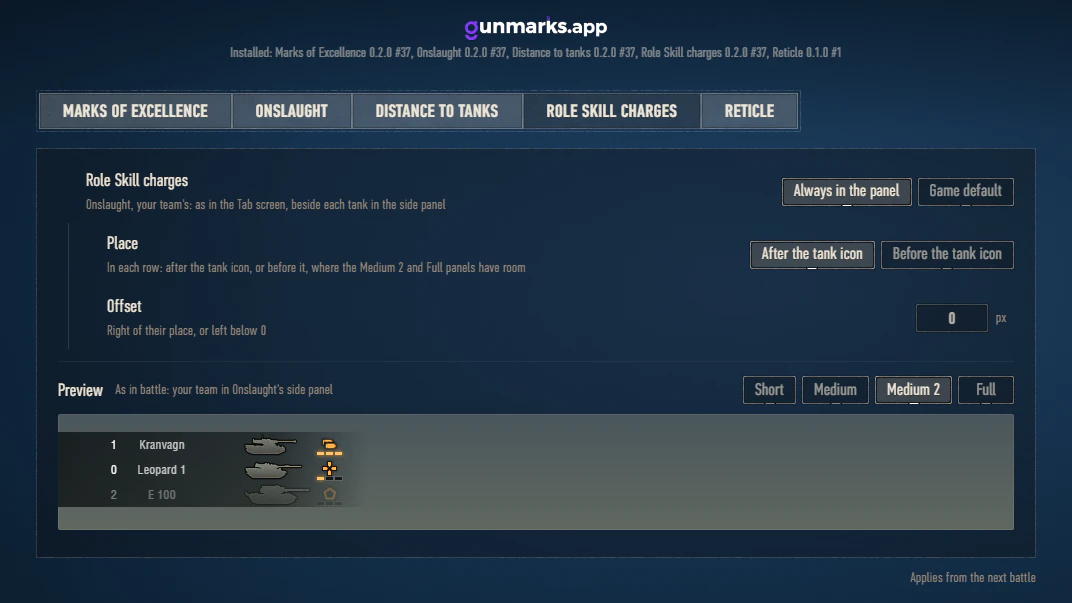
Every setting3 settings, each with what it does and its default
Team listsApplies from the next battle
- Role Skill chargesOnslaught, your team's: as in the Tab screen, beside each tank in the side panelAlways in the panel
- PlaceIn each row: after the tank icon, or before it, where the Medium 2 and Full panels have roomAfter the tank icon
- OffsetRight of their place, or left below 00 px
Install
Close World of Tanks
Get it from its page on the Mod Hub
Its page there:
Its file is one zip with everything it needs: the mod and openwg_gameface.
Extract it into your World of Tanks folder
The folder with
WorldOfTanks.exein it, for exampleC:\Games\World_of_Tanks_EU. The zip'smodsfolder goes into the game's, so you end up with:Your World of Tanks folder- mods\2.4.1.1
- app.gunmarks
- app.gunmarks.roleskills_1.0.0.wotmodRole Skill charges
- net.openwg
- net.openwg.gameface_1.2.2.wotmodopenwg_gameface
- app.gunmarks
Nothing else of Gunmarks is needed: the mod is one file. It runs alone, or beside any other Gunmarks mod, whatever their versions. They share one garage panel and one settings page.
If another mod already put a
net.openwg.gameface_*.wotmodinmods\2.4.1.1, keep only one of them.- mods\2.4.1.1
Start the game
The Gunmarks panel appears in the garage; its gear opens the settings. Role Skill charges keeps its settings in
%APPDATA%\Wargaming.net\WorldOfTanks\mods\app.gunmarks\roleskills.
Updating
When Role Skill charges has a new version, the garage panel says so and its Download button opens this page.
- Close the game, get Role Skill charges again from its page on the Mod Hub and extract it over the old files.
- A mod's file is named after its version: if it is left with two files, delete the older one.
- Only that mod changes, and your settings stay.
- It keeps them, and what it records, in
%APPDATA%\Wargaming.net\WorldOfTanks\mods\app.gunmarks\roleskills. Coming from a version that kept them inmods\configs\app.gunmarks\roleskills, in the game folder, it copies them there on its first start and leaves the old copy as it is. - After a World of Tanks update the game uses a new
modsfolder, named after its version: wait for the mod’s release for it.
Coming from an older version
- Coming from 0.2.3, 0.2.2, 0.2.1, 0.2.0, 0.1.1 or 0.1.0: after extracting, delete the old
app.gunmarks.roleskills_0.2.3.wotmod,app.gunmarks.roleskills_0.2.2.wotmod,app.gunmarks.roleskills_0.2.1.wotmod,app.gunmarks.roleskills_0.2.0.wotmod,app.gunmarks.roleskills_0.1.1.wotmodorapp.gunmarks.roleskills_0.1.0.wotmod, whichever you have. - Role Skill charges needs no Gunmarks Core.
app.gunmarks.core_*.wotmodis for the mods of 0.1.1 and earlier, which do: once every mod of yours is newer than that, delete it. The settings page says when. - From Gunmarks in one file: delete
app.gunmarks_0.1.0.wotmodfrommods\2.4.1.1. Each mod takes over your settings, the panels' places and your recorded battles on its first start.
Removing
- Delete
app.gunmarks.roleskills_1.0.0.wotmodfrommods\2.4.1.1\app.gunmarks: your other Gunmarks mods keep running. With none left, delete the folder. - Its own files, your settings of it among them, stay in
%APPDATA%\Wargaming.net\WorldOfTanks\mods\app.gunmarks\roleskills: delete that folder to remove them too, andmods\configs\app.gunmarks\roleskillsin the game folder if it is there. - Keep
net.openwgif another mod uses it.
1.0.0 #117 Nov 2026 · 2 new · 5 changed · 3 fixedLatest
- Role Skill charges is ready for your language (its settings and preview): once players have translated it on gunmarks.app/mod/translate, pick it in Settings > General > Language (Auto follows the game). Each update brings the translations approved by then, with numbers and dates written your language's way; until then it stays in English.
- The update notice says when an update is required: a version that is no longer supported is named with the version to get and why, cannot be put off, and has its features that use gunmarks.app off until it is updated. A version whose support ends soon says so on its notice.
- Versions before 1.0.0 are no longer supported: update every Gunmarks mod you have. An older one's features that use gunmarks.app stop.
- The settings open on a card for each Gunmarks mod you have, with its picture and version; a mod's settings list every mod beside them by its full name. General holds Language and Privacy.
- Every setting and tab has a small icon of what it is about.
- Your settings now live in %APPDATA%\Wargaming.net\WorldOfTanks\mods\app.gunmarks\, shared by every game client of yours, so reinstalling or repairing the game keeps them. They move there by themselves at the first start. Keep the old mods\configs\app.gunmarks\ folder until every Gunmarks mod you have is updated: what has not moved yet would be lost with it.
- Usage figures and error reports are sent only once you turn them on, in Settings > General > Privacy (one switch for every Gunmarks mod). Turned off again, nothing more is sent and what was waiting is deleted, as is what an earlier version had kept to send.
- The mouse wheel scrolls the settings' lists the right way round.
- With Onslaught installed too, the settings open from the Random garage as well (the Gunmarks panel's gear, and the gunmarks.app entry in Aslain's Mod Menu or ModsList); they opened only in the Onslaught garage.
- Your settings are no longer written over with only part of them when another program, such as a backup or an antivirus, holds their file as the game starts.
0.2.3 #4031 Oct 2026 · 1 changed
- Updated for World of Tanks 2.4.1.1.
0.2.2 #3917 Oct 2026 · 1 new · 1 fixed
- Garage panel: hide it with the X in its top right corner; the mods keep working. Bring it back with the small "g" next to the notifications, at the bottom right of the garage. With Aslain's Mod Menu or ModsList installed, use the gunmarks.app entry in their list instead.
- Settings: tab names are in capital letters again.
0.2.1 #3814 Oct 2026 · 2 changed
- Updated for World of Tanks 2.4.1.0.
- The game no longer restarts once when the mod is first installed.
Earlier releases (3)
0.2.0 #376 Oct 2026 · 1 new · 6 changed · 1 fixed
- Choose where the Role Skills show: after the tank icon, or before it, between the tank's name and its icon.
- The mod is now a single file with its own version and updates: Gunmarks Core is no longer needed. Once all your Gunmarks mods are updated, delete app.gunmarks.core_*.wotmod.
- The offset now goes from -400 to 400 pixels, so the Role Skills can stand anywhere in a row.
- Settings: the preview shows the side panel in the size you use in battle, and you can switch it to its other sizes.
- Settings: each Gunmarks mod has its own tab.
- Settings: shows each installed Gunmarks mod with its version.
- The update notice lists each of your mods that has an update, with your version and the new one.
- Garage panel: no longer stays on top of the equipment, shells and consumables screens or the list of all vehicles.
0.1.1 #363 Oct 2026 · 1 fixed · 3 changed · with every mod
- Now works alongside PMOD and XVM, which Aslain's modpack and ProMod install. Both change the battle's team lists in a way that hid the charge levels from the mod, so nothing showed.
- The offset now goes up to 160 pixels, enough to clear the HP bars that other side-panel mods draw next to the tanks.
- When nothing can be shown in an Onslaught battle, the game's log says why.
- If your openwg_gameface cannot show the Gunmarks panels on your game version (1.2 and later are made for 2.4.1), the game's log says so and names the version to install.
0.1.0 #352 Oct 2026 · 4 new · 4 changed · with every mod
- Role Skill charges is now its own mod, with Gunmarks Core: install it alone or with any other Gunmarks mod.
- Settings: a live preview of the Role Skills in the side panel.
- Settings: lists the Gunmarks mods that are running, and says why an installed one is not.
- Its own page on the Mod Hub, with Gunmarks Core included in the download.
- Updated for World of Tanks 2.4.0.2.
- Your settings from 0.1.0 move over on the first start. Delete app.gunmarks_0.1.0.wotmod: while it is still installed, it does not run.
- Its own config.json, in mods/configs/app.gunmarks/roleskills/.
- Settings: now a full-screen page with tabs; the offset is typed in exact pixels.
Up to 0.1.1 #36 it was released together with the other Gunmarks mods, which shared one version: this is its part of those releases. Their whole history is on the page of every mod.