
Reticle
What is new in #1: First official release, with special guns, shell info, Responsive reticle and no size limit
What it does
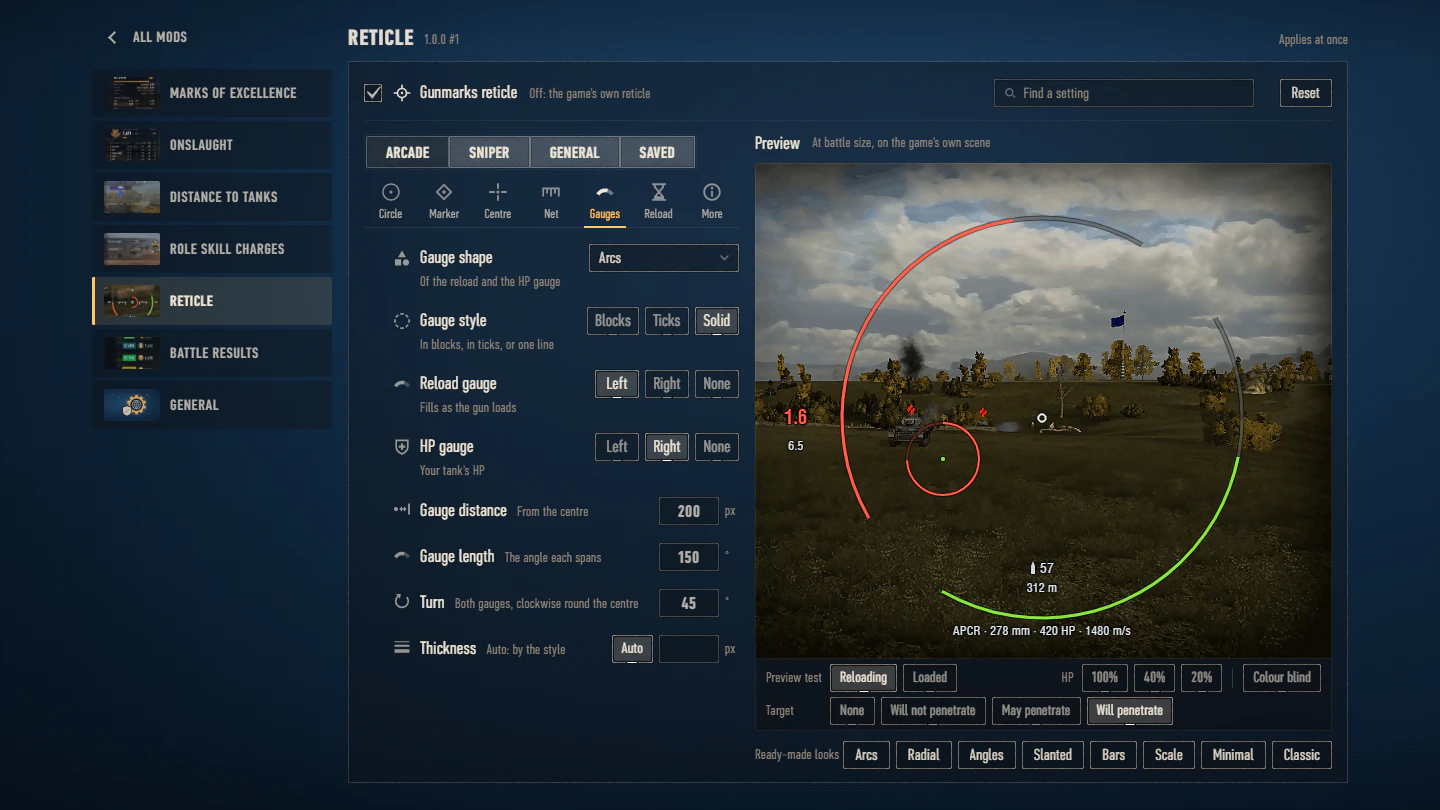
In place of the game's reticle in arcade and sniper mode, a clean one drawn to your settings: a gauge that fills as the gun loads and one with your tank's HP (arcs, angles, slanted or upright bars; in blocks, in ticks or in one line), the reload time on a slanted plate over the full reload time or the time to full aim, a ranging net, a centre mark, the shells left and the distance to the tank you aim at, and an aiming circle of its own, coloured by penetration, that fills as the gun loads. Seven ready-made looks to start from; every part has shapes to pick from and a weight and a size of its own, down to a tenth of a pixel, and the size, line weight, opacity and colours of the whole are yours to set, colour blind ones too; sniper mode can have settings of its own. Keep your reticles by name, pass one on as a code, or send it to gunmarks.app, where it gets a page and a number under your player name: another player types that number, or picks one of the most used there. The settings show it on the game's own scene as you change them, and open in a battle too, where a change is drawn at once. Replaces the client's crosshair movie with a rebuild of it, so another mod that replaces that movie cannot run beside it, and after a game update the game's own reticle is back until the mod is updated too.
The reticle
- A reticle of its own in arcade and sniper mode: reload and HP gauges, the reload time on a slanted plate, a net across the centre, a centre mark, the shells left and the distance to your target.
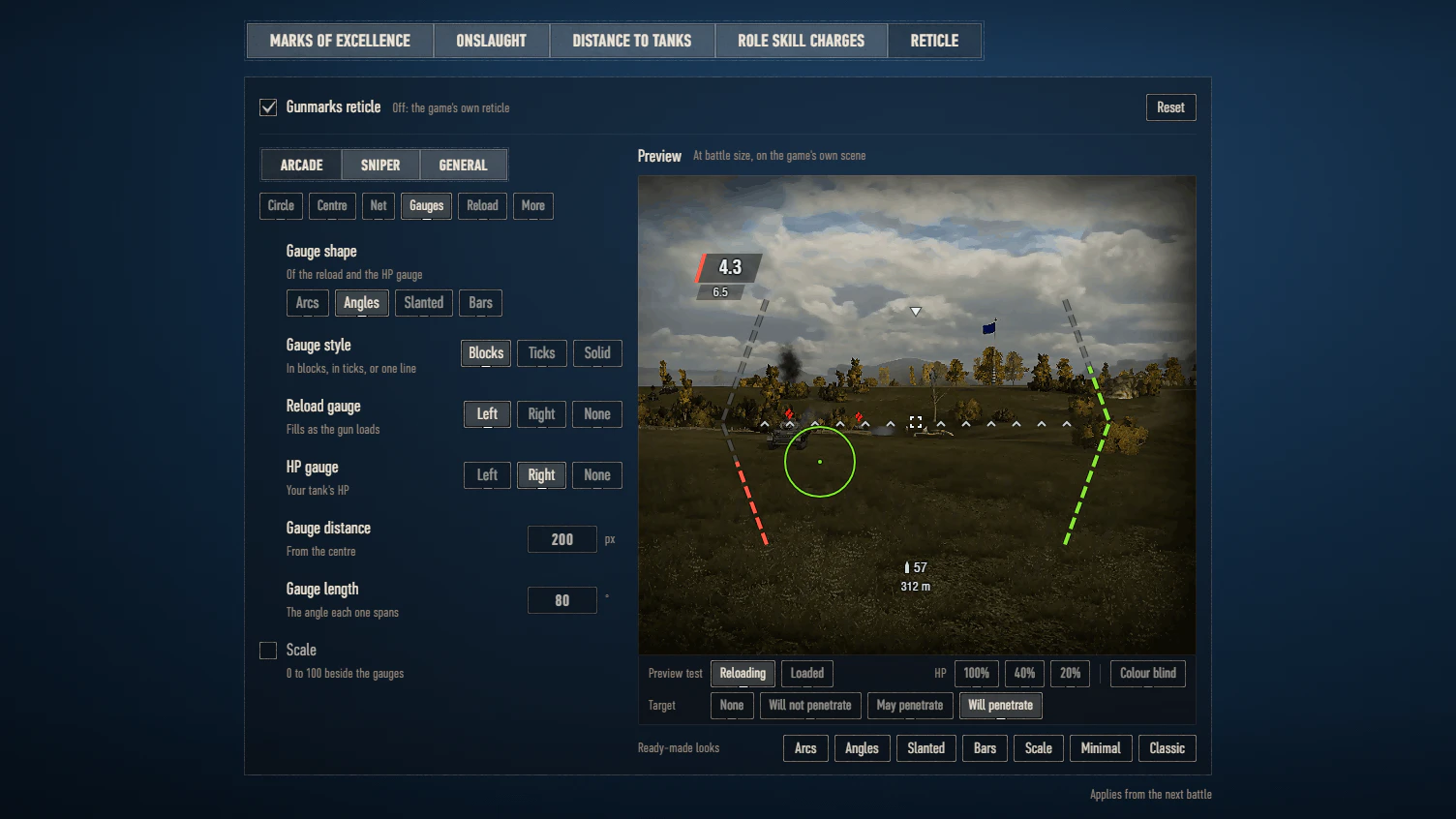
- The gauges as arcs, angles, slanted lines or upright bars, in blocks, in fine ticks or as one solid line, turned round the centre as you like; the net as a ruler, ticks, chevrons or dots; twelve centre marks.
Aiming circle
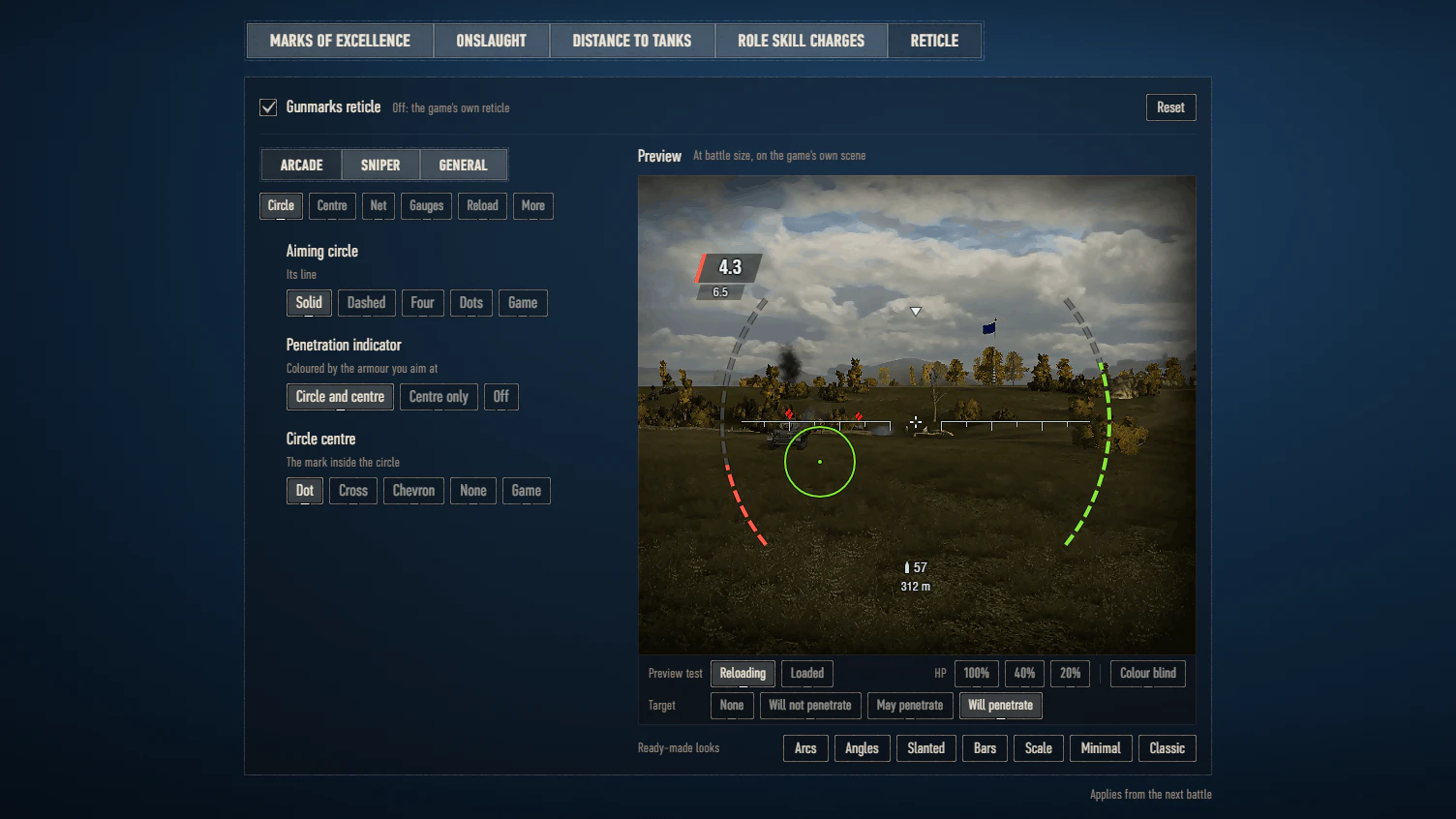
- An aiming circle of its own, whole, dashed, dotted, in pieces or in ticks, that fills as the gun loads, with a penetration indicator: the circle and its middle, or the middle alone as in the game.
Settings
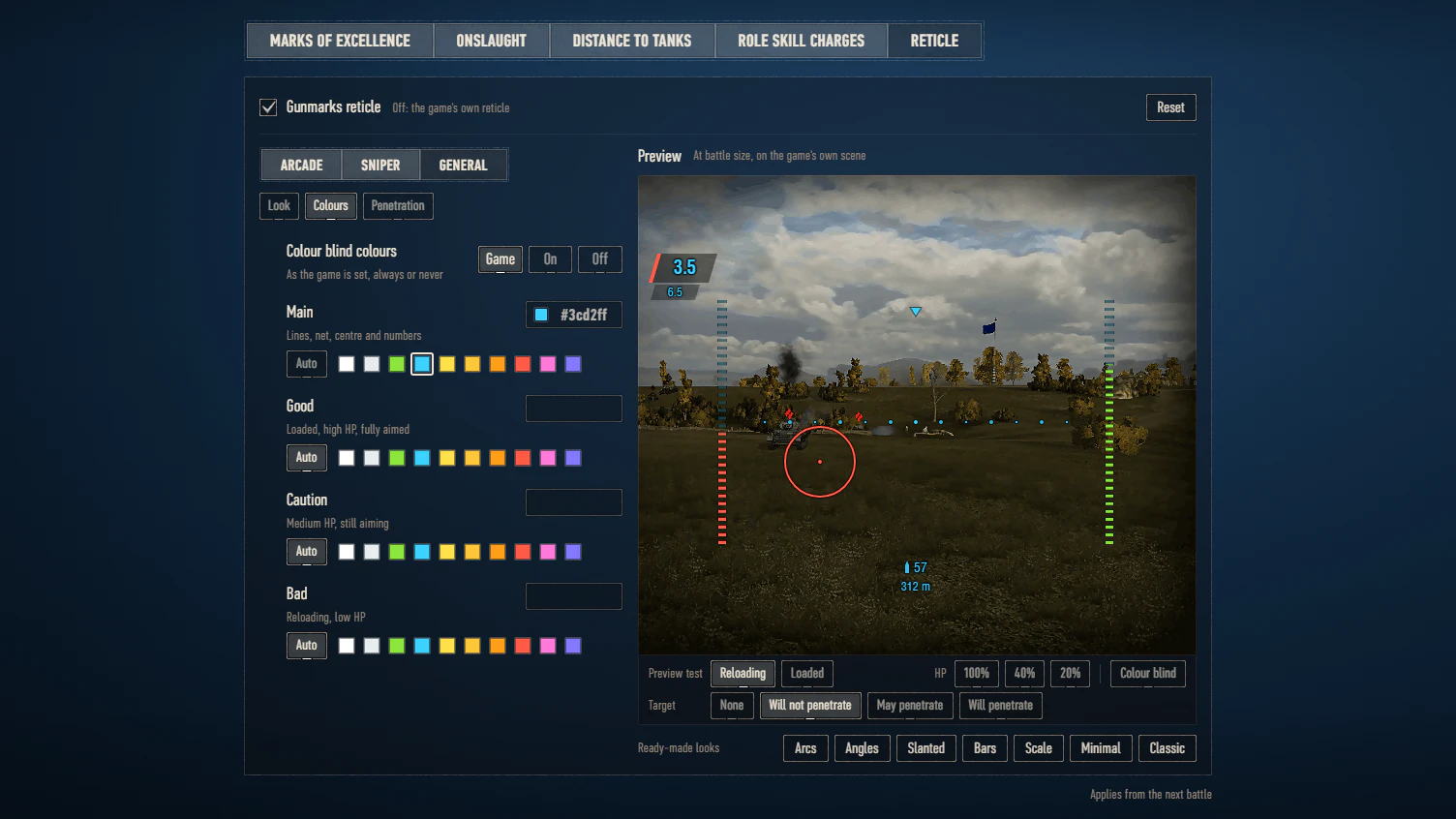
- Size, line weight, opacity and your own colours, colour blind ones too; sniper mode with the arcade settings or its own, and eight ready-made looks.
- Set up on a live preview at battle size, on the game’s own reticle scene, and in a battle too (F11), where a change shows at once.
Saved and shared
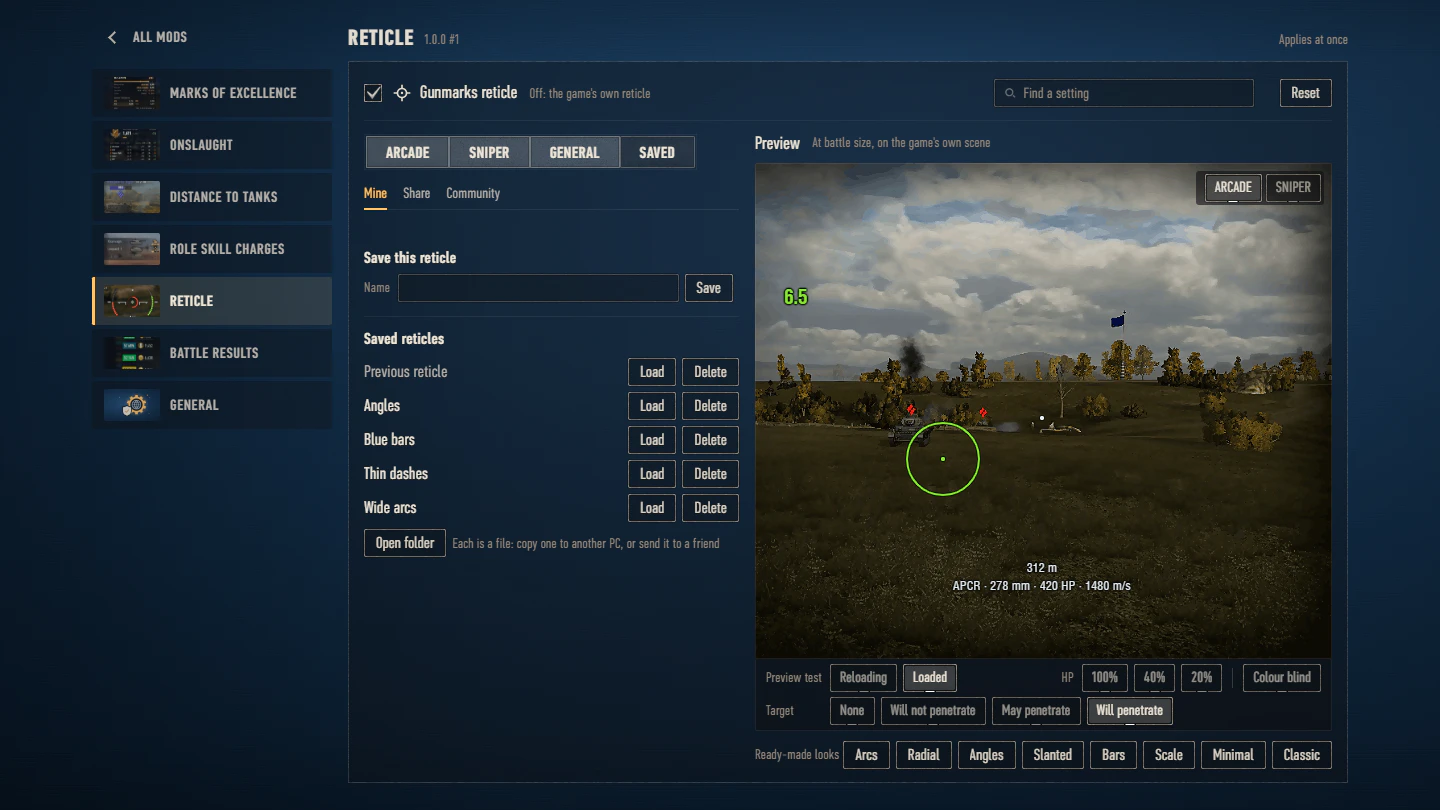
- Your reticles saved by name and passed on as a code; one of yours on gunmarks.app under your player name, and the community’s taken by their number or from the most used, seen in the preview first.
Good to know
Before you install
- The mod replaces the game’s reticle file with a rebuild of it, made for one version of the game, and works on every region’s client of it. After an update to a new game version it switches itself off until its update for that version is out, and the settings page says why.
With other mods
- When another mod changes the game’s reticle files, the mod leaves the reticle to it and stays off; the settings page says why.
Where it works
- Arcade and sniper mode only: the artillery view and the view after your tank is destroyed keep the game’s reticle.
- Twin guns and dual guns have your aiming circle too: a twin gun firing both barrels at once shows two arcs in its place, dashed for a barrel whose shot will not reach the target. A few guns whose aiming circle is the mechanic itself (charged shots and the like) keep the game’s. The game’s clip and drum counters stay, unless you turn them off.
- Tanks with dual accuracy, such as the Type 57 and the Type 63, keep their second aiming circle, as one thin line.
- Where the game changes its net, as in siege mode, its own net shows.
Tips
- To go back to the game’s reticle, untick “Gunmarks reticle” in the settings, or delete the mod’s file.
Works with
In battle2 pictures
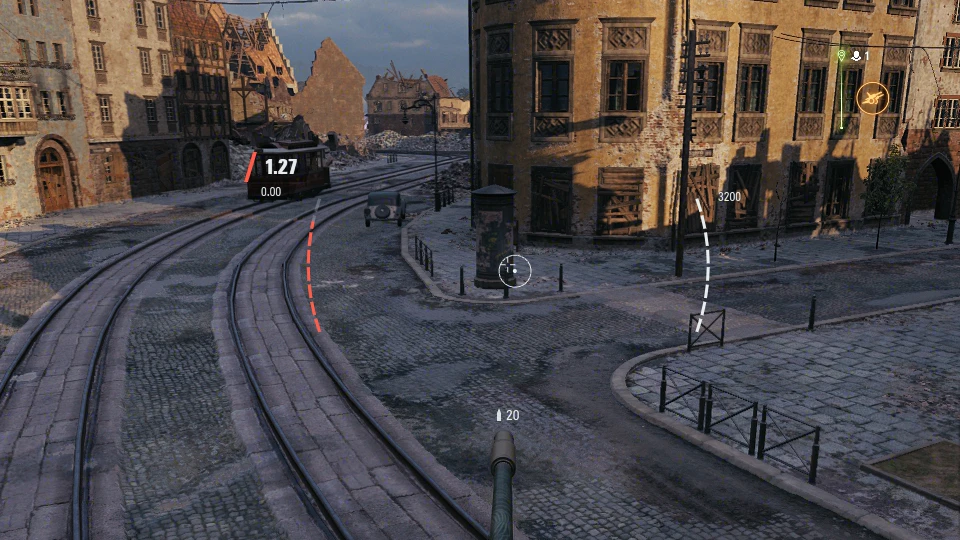
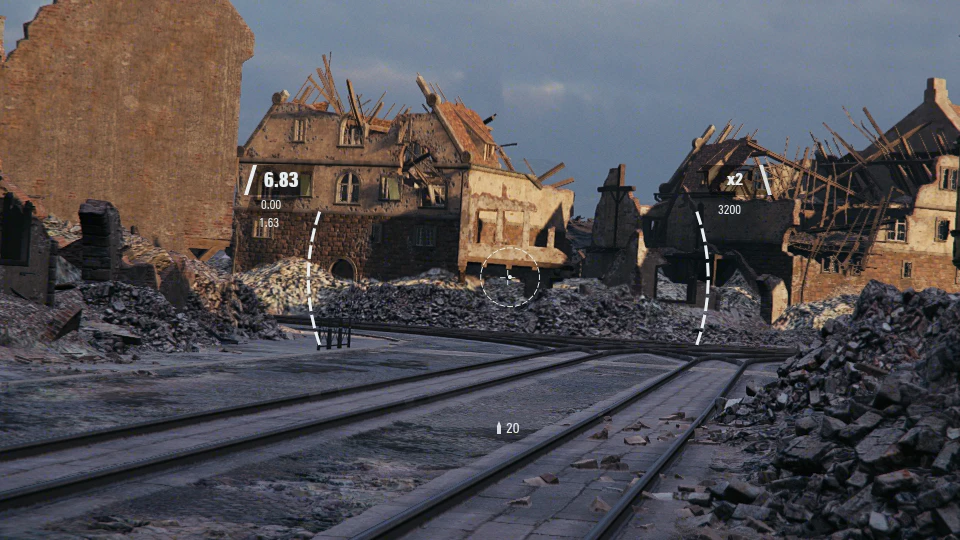
The gear on the garage panel opens the settings page, where every Gunmarks mod you have has a tab of its own. Every change shows at once in its preview, and the line under the tab says when it applies in the game.
Settings page and your own looks9 pictures
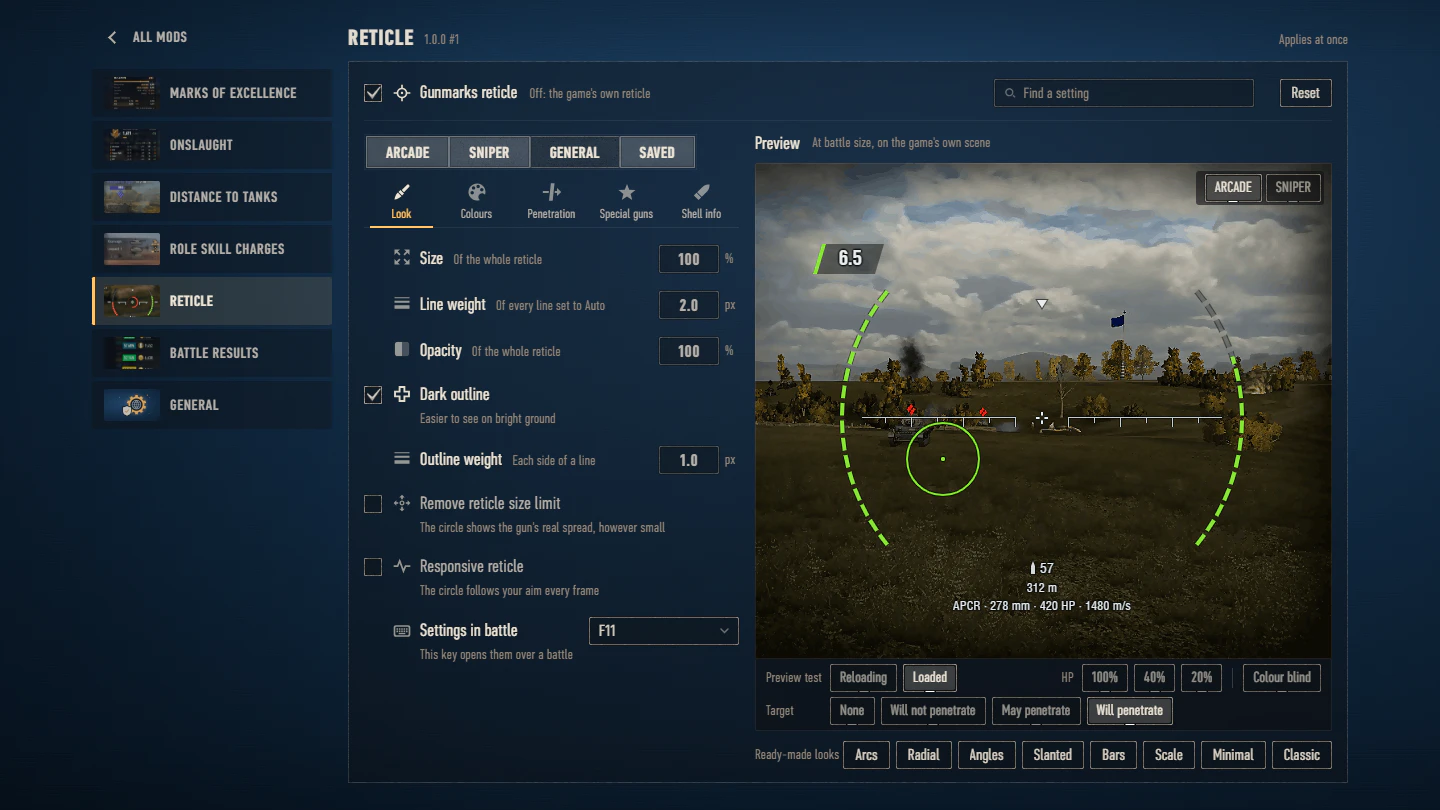
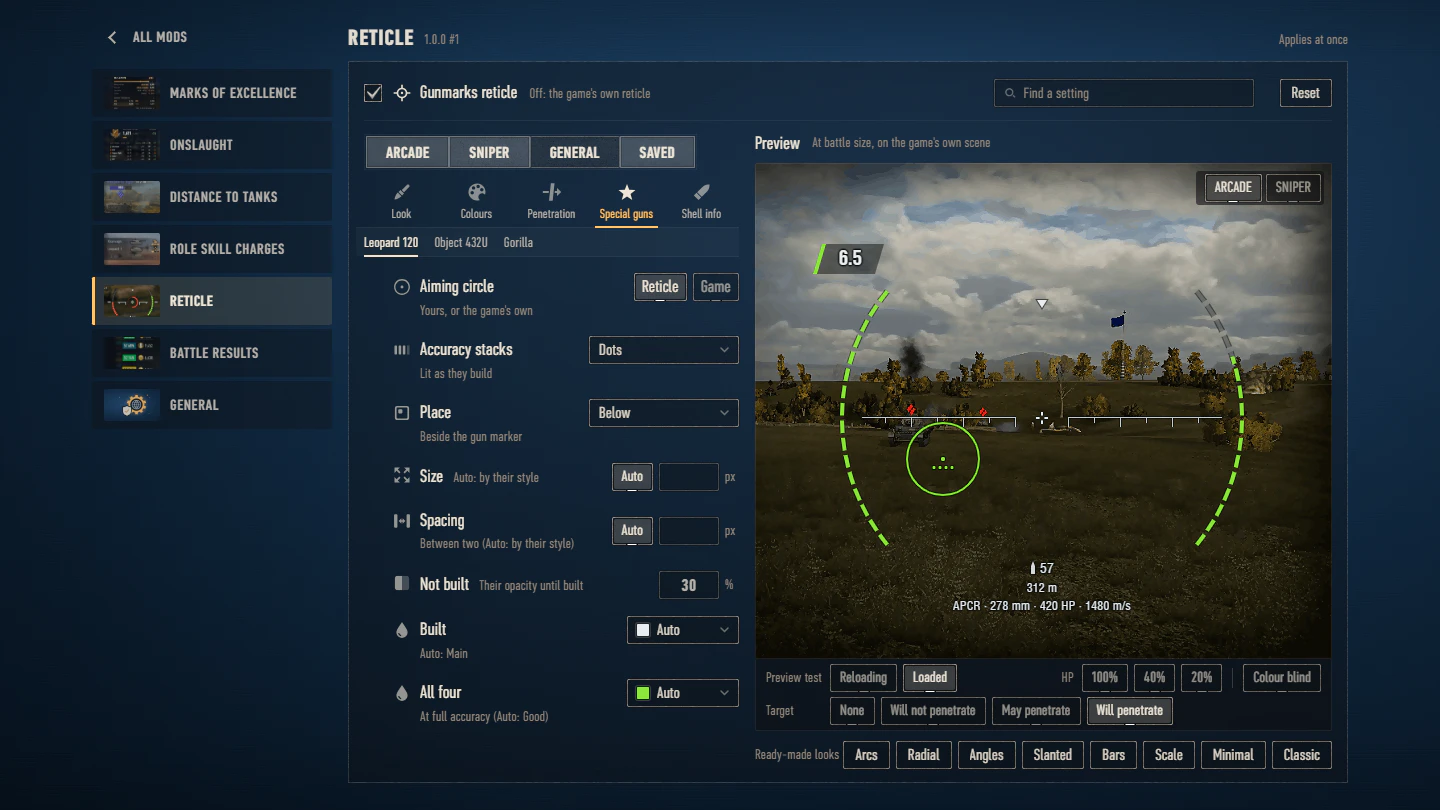
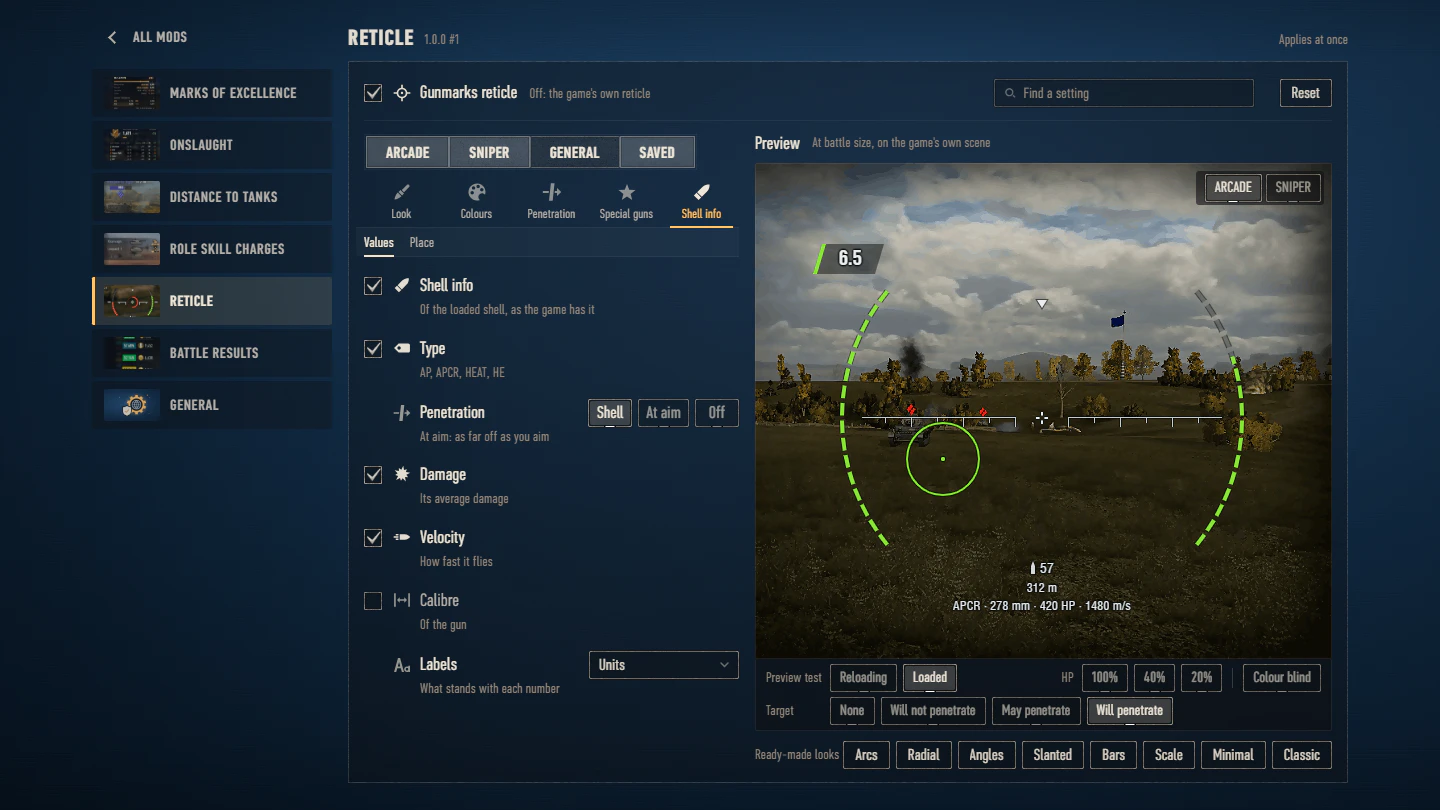
Every setting139 settings, each with what it does and its default
ReticleApplies at once
Reticle
- Gunmarks reticleOff: the game's own reticleOn
Look
- SizeOf the whole reticle100 %
- Line weightOf every line set to Auto2.0 px
- OpacityOf the whole reticle100 %
- Dark outlineEasier to see on bright groundOn
- Outline weightEach side of a line1.0 px
- Remove reticle size limitThe circle shows the gun's real spread, however smallOff
- Responsive reticleThe circle follows your aim every frameOff
- Settings in battleThis key opens them over a battleF11
Colours
- Colour blind coloursAs the game is set, always or neverGame
- MainLines, net, centre and numbersAuto
- GoodLoaded, high HP, fully aimedAuto
- CautionMedium HP, still aimingAuto
- BadReloading, low HPAuto
Penetration
- Will penetrateThe armour is thin enoughAuto
- May penetrateIt can go either wayAuto
- Will not penetrateThe armour is too thickAuto
Special guns: Leopard 120 Verbessert
- Aiming circleYours, or the game's ownReticle
- Accuracy stacksLit as they buildDots
- PlaceBeside the gun markerBelow
- SizeAuto: by their styleAuto
- SpacingBetween two (Auto: by their style)Auto
- Not builtTheir opacity until built30 %
- BuiltAuto: MainAuto
- All fourAt full accuracy (Auto: Good)Auto
Special guns: Object 432U
- Aiming circleYours, or the game's ownReticle
- FillHow the charge fills the circleFrom the top
- Level marksA tick where each level endsOff
- OverheatAt full charge, the time leftInside
- ChargeThe levels charged (Auto: Good)Auto
- Overheat colourIts time left (Auto: Bad)Auto
Special guns: Gorilla
- Aiming circleYours, or the game's ownReticle
- FillBy the game's stages, or by timeStages
- Low charge markWhere a low charge shot can be firedTick
- Last stage markWhere the game blocks the shotOff
- Not readyNo shot yet (Auto: Bad)Auto
- Low chargeA low charge shot ready (Auto: Caution)Auto
- ReadyFully loaded (Auto: Good)Auto
Shell info: what it shows
- Shell infoOf the loaded shell, as the game has itOn
- TypeAP, APCR, HEAT, HEOn
- PenetrationAt aim: as far off as you aimShell
- DamageIts average damageOn
- VelocityHow fast it fliesOn
- CalibreOf the gunOff
- LabelsWhat stands with each numberUnits
Shell info: where
- LayoutSide by side, or one under anotherLine
- PositionBelow: under the shells leftBelow
- SizeOf its texts100 %
- Horizontal offsetLeft below 00 px
- Vertical offsetDown below 00 px
- ColourAuto: MainAuto
Sniper
- Own sniper settingsOff: sniper mode uses the arcade settingsOff
Arcade: Aiming circle
- Aiming circleIts lineSolid
- WeightAuto: the line weightAuto
- PiecesDashes, dots or ticksAuto
- LengthOf a dash or a tickAuto
- TurnClockwise0 °
- Load indicatorThe circle fills as the gun loadsBad colour
- Penetration indicatorColoured by the armour you aim atCircle and marker
Arcade: Gun marker
- Gun markerThe mark at the aiming circle's centreDot
- SizeAuto: by its shapeAuto
- WeightAuto: the line weightAuto
- GapFrom its middle to its armsAuto
- DotOne in its middleOff
Arcade: Centre mark
- Centre markAt the reticle's centreCross
- SizeOf the centre mark6 px
- WeightAuto: the line weightAuto
- GapFrom its middle to its armsAuto
- DotOne at the reticle's centreOff
Arcade: Net
- NetThe marks either side of the centreRuler
- Net widthEach side of the centre200 px
- SpacingBetween two marks26 px
- WeightAuto: the line weightAuto
Arcade: Gauges
- Gauge shapeOf the reload and the HP gaugeArcs
- Gauge styleIn blocks, in ticks, or one lineBlocks
- Reload gaugeFills as the gun loadsLeft
- HP gaugeYour tank's HPRight
- Gauge distanceFrom the centre200 px
- Gauge lengthThe angle each spans80 °
- TurnBoth gauges, clockwise round the centre0 °
- ThicknessAuto: by the styleAuto
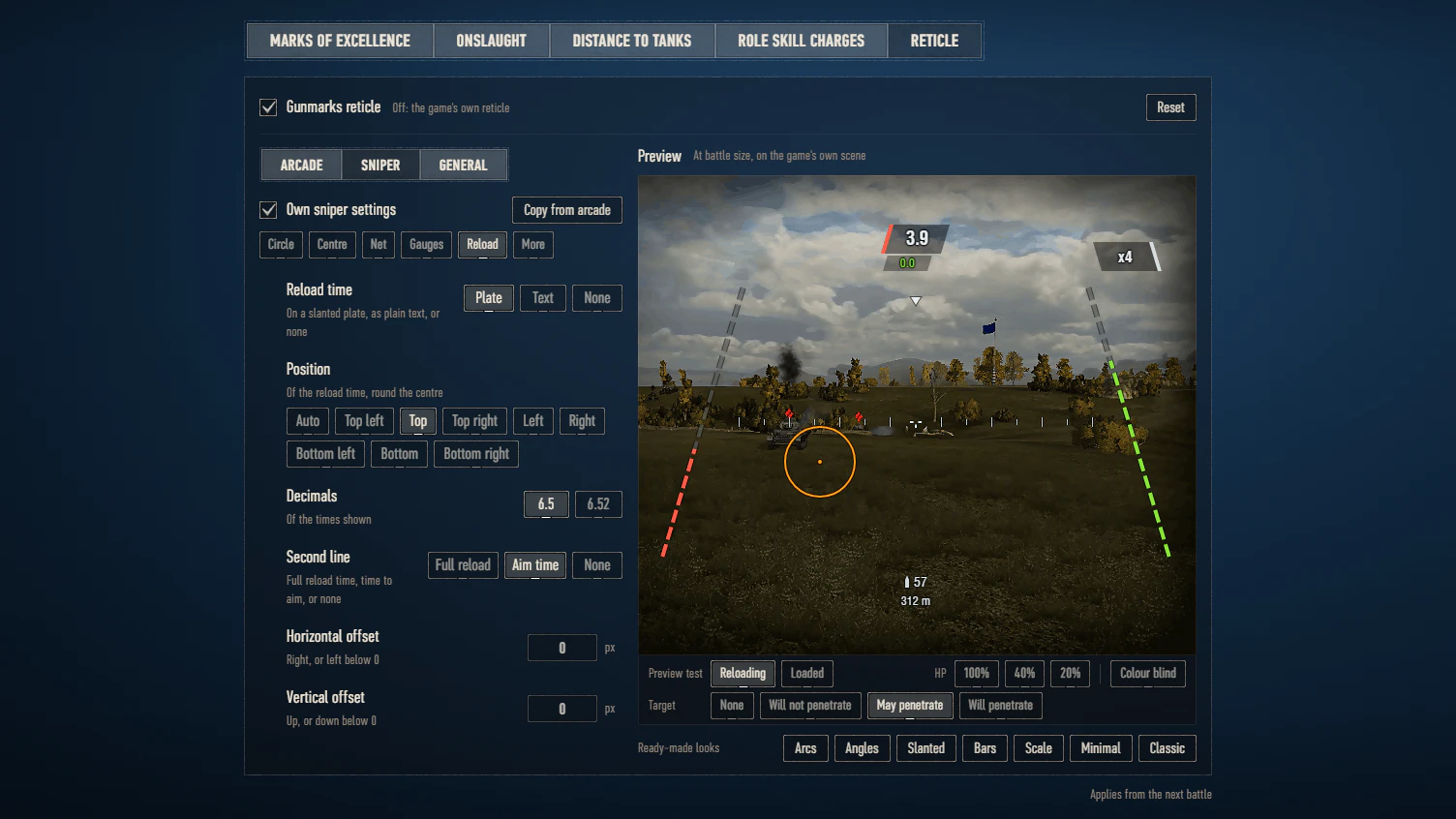
Arcade: Reload time
- Reload timeOn a slanted plate, as plain text, or nonePlate
- PositionOf the reload time, round the centreAuto
- DecimalsOf the times shown6.5
- Second lineFull reload time, time to aim, or noneFull reload
- SizeOf the reload time100 %
- Horizontal offsetLeft below 00 px
- Vertical offsetDown below 00 px
Arcade: More
- ShellsOf the loaded type, under the centreOn
- DistanceTo the tank you aim atOn
- Clip and drum countersThe game's own, for guns with a clipOn
- Gauge scale0 to 100 beside the gaugesOff
- Damage takenOn the HP gauge, the HP lost fades outOn
- HP numberAt the end of the HP gaugeOff
- Text sizeShells, distance, HP number100 %
Sniper: Aiming circle
- Aiming circleIts lineSolid
- WeightAuto: the line weightAuto
- PiecesDashes, dots or ticksAuto
- LengthOf a dash or a tickAuto
- TurnClockwise0 °
- Load indicatorThe circle fills as the gun loadsBad colour
- Penetration indicatorColoured by the armour you aim atCircle and marker
Sniper: Gun marker
- Gun markerThe mark at the aiming circle's centreDot
- SizeAuto: by its shapeAuto
- WeightAuto: the line weightAuto
- GapFrom its middle to its armsAuto
- DotOne in its middleOff
Sniper: Centre mark
- Centre markAt the reticle's centreCross
- SizeOf the centre mark6 px
- WeightAuto: the line weightAuto
- GapFrom its middle to its armsAuto
- DotOne at the reticle's centreOff
Sniper: Net
- NetThe marks either side of the centreRuler
- Net widthEach side of the centre220 px
- SpacingBetween two marks26 px
- WeightAuto: the line weightAuto
Sniper: Gauges
- Gauge shapeOf the reload and the HP gaugeArcs
- Gauge styleIn blocks, in ticks, or one lineBlocks
- Reload gaugeFills as the gun loadsLeft
- HP gaugeYour tank's HPRight
- Gauge distanceFrom the centre220 px
- Gauge lengthThe angle each spans80 °
- TurnBoth gauges, clockwise round the centre0 °
- ThicknessAuto: by the styleAuto
Sniper: Reload time
- Reload timeOn a slanted plate, as plain text, or nonePlate
- PositionOf the reload time, round the centreAuto
- DecimalsOf the times shown6.5
- Second lineFull reload time, time to aim, or noneFull reload
- SizeOf the reload time100 %
- Horizontal offsetLeft below 00 px
- Vertical offsetDown below 00 px
Sniper: More
- ShellsOf the loaded type, under the centreOn
- DistanceTo the tank you aim atOn
- Zoomx2, x4 and so onOn
- Clip and drum countersThe game's own, for guns with a clipOn
- Gauge scale0 to 100 beside the gaugesOff
- Damage takenOn the HP gauge, the HP lost fades outOn
- HP numberAt the end of the HP gaugeOff
- Text sizeShells, distance, HP number100 %
Install
Close World of Tanks
Get it from its page on the Mod Hub
Extract it into your World of Tanks folder
The folder with
WorldOfTanks.exein it, for exampleC:\Games\World_of_Tanks_EU. The zip'smodsfolder goes into the game's, so you end up with:Your World of Tanks folder- mods\2.4.1.1
- app.gunmarks
- app.gunmarks.reticle_1.0.0.wotmodReticle
- net.openwg
- net.openwg.gameface_1.2.2.wotmodopenwg_gameface
- app.gunmarks
Nothing else of Gunmarks is needed: the mod is one file. It runs alone, or beside any other Gunmarks mod, whatever their versions. They share one garage panel and one settings page.
If another mod already put a
net.openwg.gameface_*.wotmodinmods\2.4.1.1, keep only one of them.- mods\2.4.1.1
Start the game
The Gunmarks panel appears in the garage; its gear opens the settings. Reticle keeps its settings in
%APPDATA%\Wargaming.net\WorldOfTanks\mods\app.gunmarks\reticle.
Updating
When Reticle has a new version, the garage panel says so and its Download button opens this page.
- Close the game, get Reticle again from its page on the Mod Hub and extract it over the old files.
- A mod's file is named after its version: if it is left with two files, delete the older one.
- Only that mod changes, and your settings stay.
- It keeps them, and what it records, in
%APPDATA%\Wargaming.net\WorldOfTanks\mods\app.gunmarks\reticle. Coming from a version that kept them inmods\configs\app.gunmarks\reticle, in the game folder, it copies them there on its first start and leaves the old copy as it is. - After a World of Tanks update the game uses a new
modsfolder, named after its version: wait for the mod’s release for it.
Coming from an older version
- Coming from 0.2.5, 0.2.4, 0.2.3, 0.2.2, 0.2.1, 0.2.0, 0.1.1 or 0.1.0: after extracting, delete the old
app.gunmarks.reticle_0.2.5.wotmod,app.gunmarks.reticle_0.2.4.wotmod,app.gunmarks.reticle_0.2.3.wotmod,app.gunmarks.reticle_0.2.2.wotmod,app.gunmarks.reticle_0.2.1.wotmod,app.gunmarks.reticle_0.2.0.wotmod,app.gunmarks.reticle_0.1.1.wotmodorapp.gunmarks.reticle_0.1.0.wotmod, whichever you have. - Reticle needs no Gunmarks Core.
app.gunmarks.core_*.wotmodis for the mods of 0.1.1 and earlier, which do: once every mod of yours is newer than that, delete it. The settings page says when.
Removing
- Delete
app.gunmarks.reticle_1.0.0.wotmodfrommods\2.4.1.1\app.gunmarks: your other Gunmarks mods keep running. With none left, delete the folder. - Its own files, your settings of it among them, stay in
%APPDATA%\Wargaming.net\WorldOfTanks\mods\app.gunmarks\reticle: delete that folder to remove them too, andmods\configs\app.gunmarks\reticlein the game folder if it is there. - Keep
net.openwgif another mod uses it.
1.0.0 #117 Nov 2026 · 8 new · 6 changed · 5 fixedLatest
- Remove reticle size limit (General > Look): your aiming circle shows the gun's real spread however small it gets, where the game stops it at a size of its own. It does what Pruszko's Reticle Size Limit Remover does, so that mod is no longer needed. Off as it comes.
- Responsive reticle (General > Look): the gun and the aiming circle follow your mouse every frame instead of ten times a second, as Pruszko's Responsive Reticle does (with both installed, the Reticle leaves it to that mod). Your aim reaches the game's server as you move it, so a shot goes where the circle shows; the circle's bloom and aiming time stay as the game works them out. Off as it comes; not in replays, with the server reticle, in the artillery view or on a gun fixed in its hull.
- Shell info (General > Shell info): your loaded shell's type, penetration (its own, or at the distance you aim at), damage, velocity and calibre, as the game's shell tooltip gives them, under your shells left in the reticle's style, placed, sized and coloured as you like. On as it comes.
- Special guns (General > Special guns, a tab and a preview for each tank): the Leopard 120 Verbessert, the Object 432U and the Gorilla get your aiming circle with their gun's mechanic drawn in it (the Leopard's accuracy stacks, the 432U's charge and the time left before it overheats, the Gorilla's reload and its low charge point), each in a style of your own. Set a tank's Aiming circle to Game to keep the game's.
- Find a setting: type in the box at the top of the Reticle's settings, and every setting whose name, description or values have your words shows under its group, with a Go to group button.
- In General and Saved, an Arcade | Sniper switch on the preview shows your reticle in either mode.
- The Reticle is ready for your language (its settings, your saved reticles and, in battle, the shell info and the reload time's decimal mark wherever the game's battle fonts can show it): once players have translated it on gunmarks.app/mod/translate, pick it in Settings > General > Language (Auto follows the game). Each update brings the translations approved by then, with numbers and dates written your language's way; until then it stays in English.
- The update notice says when an update is required: a version that is no longer supported is named with the version to get and why, cannot be put off, and has its features that use gunmarks.app off until it is updated. A version whose support ends soon says so on its notice.
- Versions before 1.0.0 are no longer supported: update every Gunmarks mod you have. An older one's features that use gunmarks.app stop.
- The settings open on a card for each Gunmarks mod you have, with its picture and version; a mod's settings list every mod beside them by its full name. General holds Language and Privacy.
- Every setting and tab has a small icon of what it is about.
- The Reticle's settings are more compact: the groups (Circle, Marker, Centre and the rest) are tiles with a picture each, a setting is one line with what it does under it, a setting with many values is a dropdown, and a colour is one button that opens its swatches and code. Point at a group or a setting and the preview keeps what it changes lit and fades the rest.
- Your settings, your reticle and your saved reticles now live in %APPDATA%\Wargaming.net\WorldOfTanks\mods\app.gunmarks\, shared by every game client of yours, so reinstalling or repairing the game keeps them. They move there by themselves at the first start. Keep the old mods\configs\app.gunmarks\ folder until every Gunmarks mod you have is updated: what has not moved yet would be lost with it.
- Usage figures and error reports are sent only once you turn them on, in Settings > General > Privacy (one switch for every Gunmarks mod). Turned off again, nothing more is sent and what was waiting is deleted, as is what an earlier version had kept to send.
- The mouse wheel scrolls the settings' lists the right way round.
- Below 100 % Opacity the aiming circle no longer turns into thick, blurred bars when it grows (above all in sniper mode).
- With Onslaught installed too, the settings open from the Random garage as well (the Gunmarks panel's gear, and the gunmarks.app entry in Aslain's Mod Menu or ModsList); they opened only in the Onslaught garage, or with F11 in a battle.
- On the Ho-Ri Shugo the game's aiming circle and gun marker no longer show beside yours: the tank gets your circle and gun marker as other tanks do, and they make way for the game's rocket sight while the Coaxial Rocket Launcher is up.
- Your settings are no longer written over with only part of them when another program, such as a backup or an antivirus, holds their file as the game starts.
0.2.5 #831 Oct 2026 · 1 changed
- Updated for World of Tanks 2.4.1.1.
0.2.4 #718 Oct 2026 · 1 fixed
- The reticle no longer switches off after a battle in which it loaded late; if it did switch off, it now comes back.
0.2.3 #617 Oct 2026 · 1 new · 1 fixed
- Garage panel: hide it with the X in its top right corner; the mods keep working. Bring it back with the small "g" next to the notifications, at the bottom right of the garage. With Aslain's Mod Menu or ModsList installed, use the gunmarks.app entry in their list instead.
- Settings: tab names are in capital letters again, Arcade, Sniper, General and Saved too.
Earlier releases (5)
0.2.2 #514 Oct 2026 · 3 changed
- Updated for World of Tanks 2.4.1.0.
- The game no longer restarts once when the mod is first installed.
- Guns with an extra shot (AMX 67 Imbattable): the aiming circle shows as loaded while the extra shot is ready.
0.2.1 #413 Oct 2026 · 1 fixed
- Tanks with twin guns (the FV230 Canopener and its line) and dual guns now show your aiming circle and gun marker too. When a twin gun fires both barrels together, you see two arcs in your circle's colour, dashed for a barrel whose shot will not reach the target.
0.2.0 #310 Oct 2026 · 12 new · 3 changed · 1 fixed
- The aiming circle fills up as the gun reloads: in your Bad colour (the default), in its own colour, in Bad and then Good, or not at all.
- More aiming circle styles: three pieces, two brackets, or ticks. You set the number of dashes, dots or ticks, their length and how far the circle is turned.
- Twelve shapes for the gun marker and the centre mark, each with its own size, gap and centre dot.
- Set the line thickness separately for the aiming circle, gun marker, centre mark, net and gauges.
- Set the size of the reload time, the shells left, the distance and the HP number, and the spacing of the net's marks.
- Saved reticles: save your reticles by name and load them later. Loading one keeps the reticle you had as "Previous reticle".
- Share a reticle: copy it as a code, or send it to gunmarks.app, where it gets its own page and number under your player name. One reticle per player: sending again replaces yours.
- Get a reticle: enter its gunmarks.app number or its code, or pick one of the most used. Preview it in the settings before you take it; the list stays up to date.
- A shared reticle counts each player's use once, only for the reticle they keep, and never their own.
- Open the settings in a battle too (F11 by default): your changes show straight away.
- A new ready-made look, Radial: the reload and HP gauges as two long thin lines around the centre, with their gaps at the top right and bottom left, a small ring in the middle and the reload time beside them.
- Turn the reload and HP gauges around the centre to any angle. Their scale and the HP number turn with them; the reload time and the other texts stay in place, clear of the gauges.
- Line thickness in tenths of a pixel, from 0.1 to 5, and a thickness for the dark outline.
- Settings: the gun marker has its own group, and options that do nothing for the shape you picked are greyed out.
- Settings: the gauges' scale moved to More, as "Gauge scale".
- Tanks with dual accuracy, such as the Type 57 and the Type 63: their second aiming circle is now one thin, clean line instead of a faded copy of the whole circle.
0.1.1 #27 Oct 2026 · 2 fixed
- Now works on the NA and ASIA game clients too; it only ran on the EU one.
- Keeps working after small game patches that do not change the game's version number.
0.1.0 #16 Oct 2026 · 6 new
- First release.
- Its own reticle for arcade and sniper mode: reload and HP gauges, the reload time, a net across the centre, a centre mark, the shells left and the distance to your target.
- Gauges as arcs, angles, slanted lines or upright bars, made of blocks, fine ticks or one solid line; the net as a ruler, ticks, chevrons or dots; seven centre marks.
- Its own aiming circle with a penetration indicator, in the game's colours or your own.
- Size, line thickness, opacity, outline and colours (colour-blind ones too), seven ready-made looks, and separate settings for sniper mode.
- A live preview in the settings, on the game's own reticle scene.