Gunmarks
All releases

Replays without a limit, clips for Discord and builds by link

The Replay Inspector opens as many replays as you like, saves short clips of the minimap for Discord, links to a moment of a battle and shows your own win rate and damage by map and tank, and supporters keep their replays on the site. Vehicle pages share a build, an armor matchup or a photo mode shot by link, the armor view has the game’s colour-blind colours, phones ask before loading the 3D view, and Compare vehicles is easier to read.

This update is mostly about the Replay Inspector and the vehicle pages. Opening replays has no limit any more, for anyone: one battle is everything for everyone, and what supporters get more of is the tools that add many battles up and the replays the site keeps for them. A vehicle’s page can now be shared just as you set it up.

Everything that changed is below, grouped by kind.

Release notes

New7

Clips of the map, for Discord

On the Replay tab, the clapperboard among the map’s tools saves a short clip of the minimap to post on Discord, from the moment reached or up to it: an MP4, 1080 pixels across at 60 frames a second and sized for Discord’s 10 MB limit, or a GIF, which plays by itself in a Discord chat. A title strip shows the map, the tanks each side has left and the clock.

Everyone has clips of 5 seconds, 3 a day. Supporters can also run a whole battle through in one clip, put both teams beside the map and leave out the gunmarks.app logo, and their clips grow with what they gave in the last month: 10 seconds and 10 a day from €5, 20 seconds and 20 from €10, 30 seconds and 30 from €20, 60 seconds and 50 from €30.

A clip is made in your browser and counted only once it is saved, so one you stop costs nothing. On a shared replay or one you keep, Copy message gives a message for Discord with a link to the clip’s first moment.
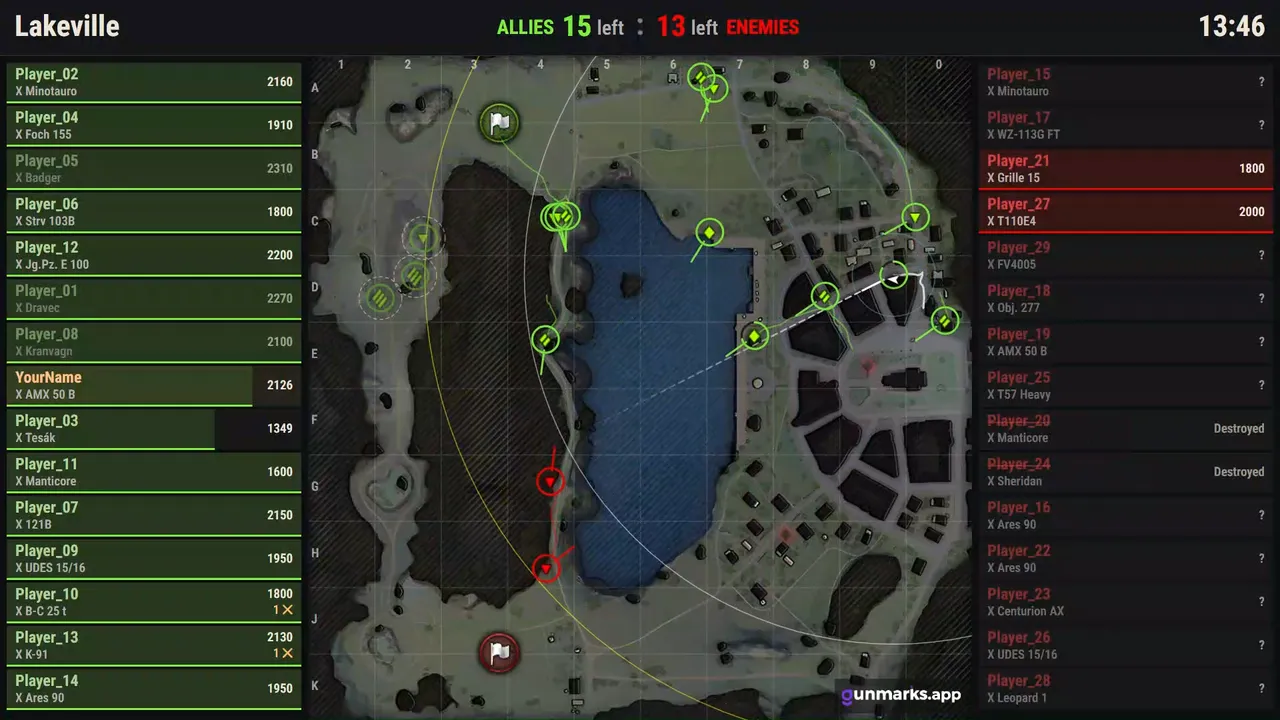
Read instead

A supporter’s clip of a whole battle on Lakeville, run through in 30 seconds, with both teams beside the map and each player’s hit points. The title strip shows the map, the tanks each side has left and the clock. From their base in the north the allies, in green, split along the lake’s west shore and into the town in the east; the enemies show in red where they are seen, the damage of each hit rising off the map. The enemies’ list on the right fills with Destroyed until none of their 15 tanks is left, at 10:33 on the clock, with 14 allies left at the enemies’ base in the south. The gunmarks.app logo sits in the map’s corner.
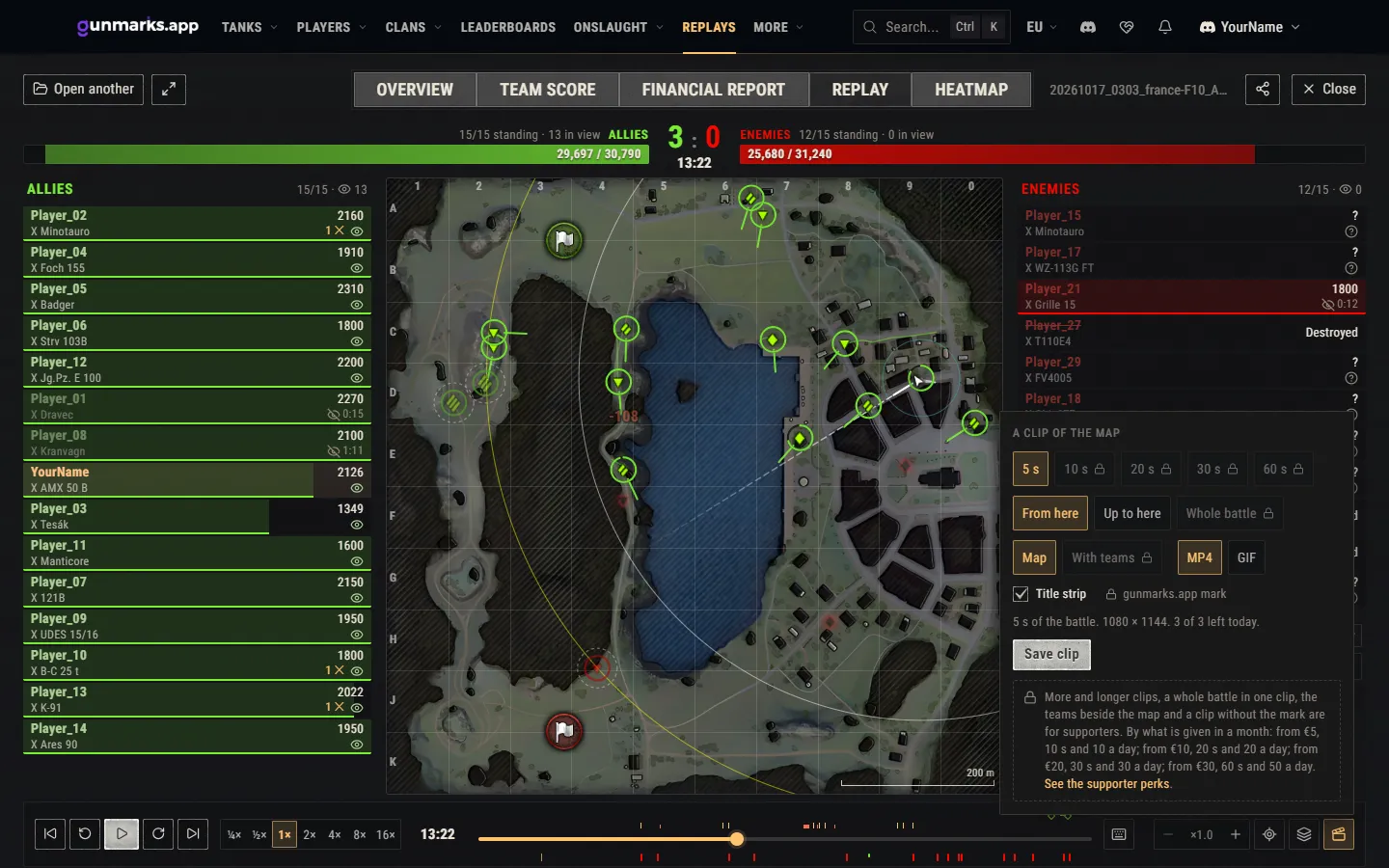
The clip tool on the Replay tab of a battle on Lakeville: 5 seconds, from here or up to here, MP4 or GIF, 3 of 3 left today; longer clips, the whole battle, the teams and no logo locked.

Share a build, an armor matchup or a photo mode shot

A vehicle’s page now keeps what you set up in its address: the modules, shells, equipment, consumables, directives, crew skills and field modifications, and in the armor view the attacker with its gun, shell and distance. Copy the address and the link opens the same build, or the same vehicle under fire from the same gun.

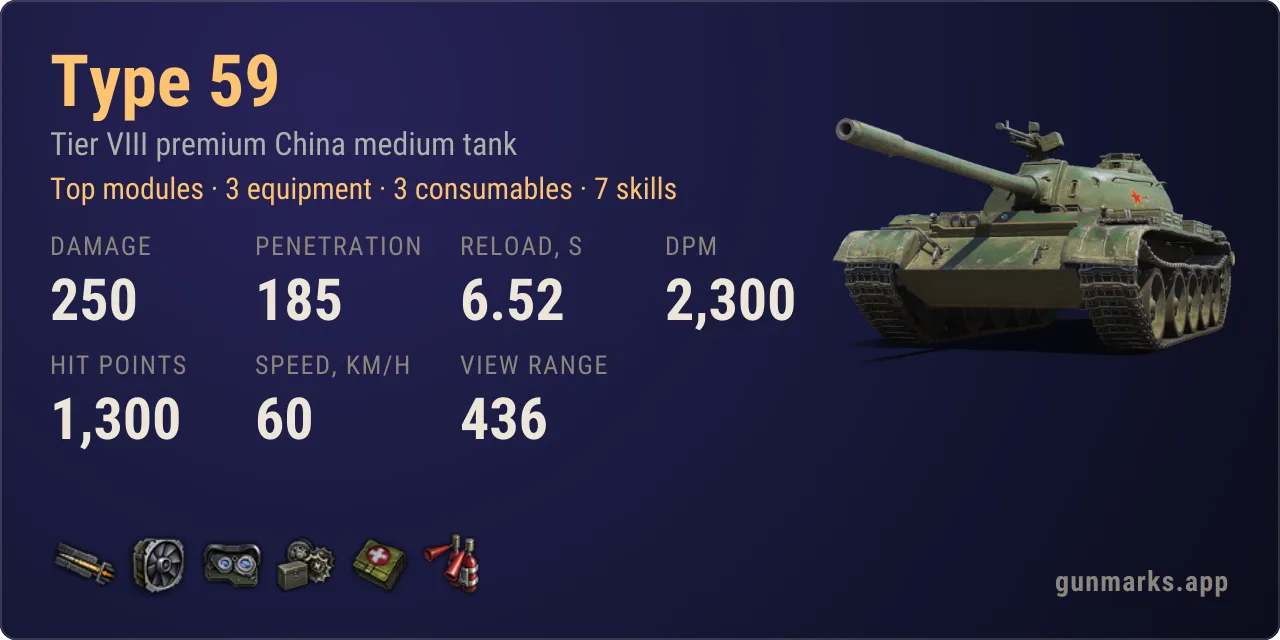
  • Share, at the top of a vehicle’s page, copies that link, or the build’s Discord card: the vehicle with its setup in a line, what is fitted and seven of its figures by the game’s own arithmetic. A build’s link pasted on Discord previews as that card.
  • Copy link in photo mode’s bar makes a link of your shot: it opens the same vehicle in the same style and marks, with the same camera, light and frame. It carries your settings, not the picture.
  • Armor, in each vehicle’s column in Compare vehicles, opens its armor view in that setup with another of the vehicles shooting at it.
The Type 59’s build as a Discord card: top modules, three pieces of equipment, three consumables and seven skills, with its damage, penetration, reload, DPM, hit points, speed and view range.

Your replays, kept on the site

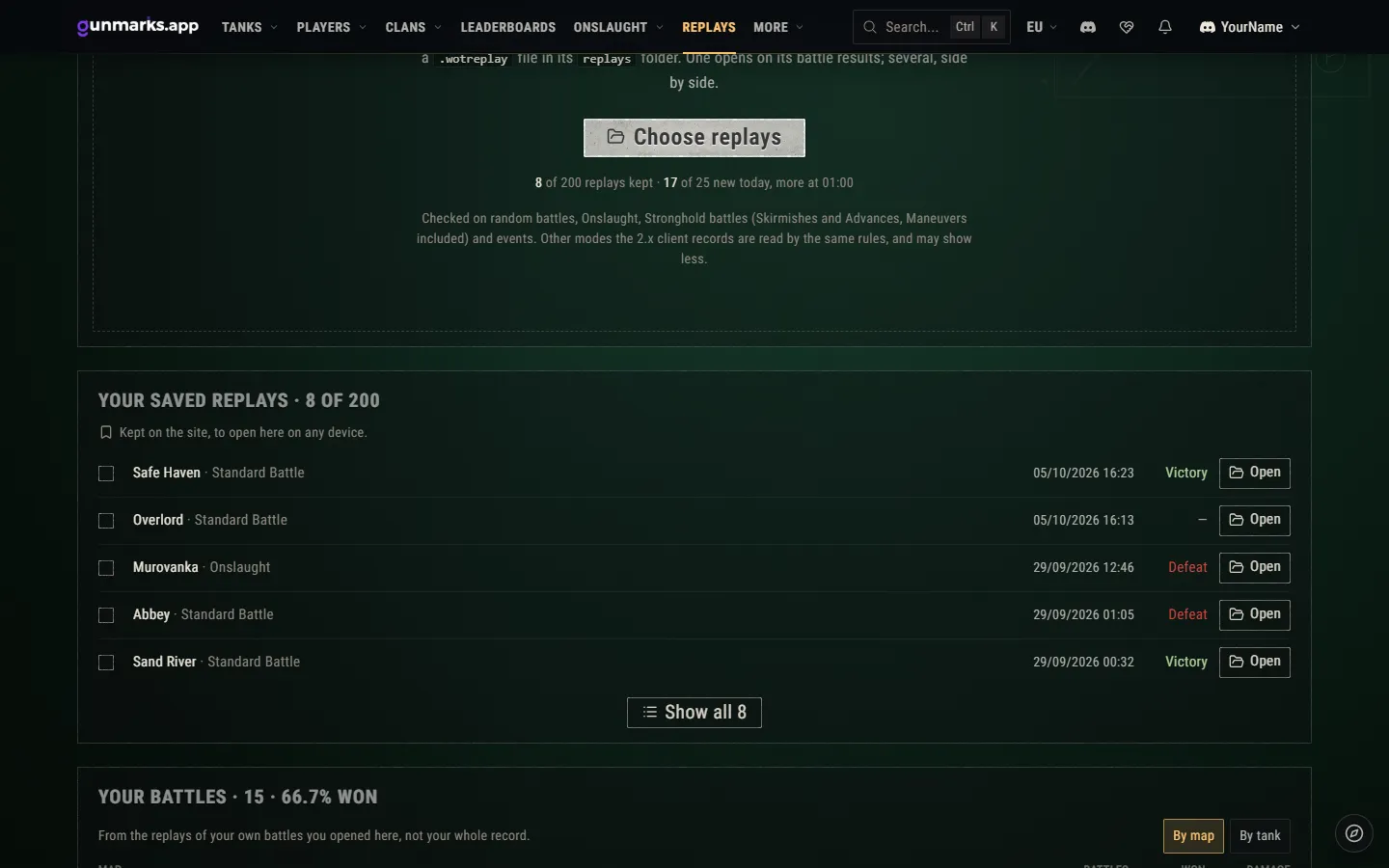
Supporters now keep their replays on the site, under Your saved replays on the Replay Inspector’s page, to open again on any device, several together, or to delete: 50 replays from €2 given in the last twelve months, 200 from €20, 500 from €50 and 1,000 from €100, with 10, 25, 50 and 100 saves a day. Up to 30 of them go in one link, which works until they stop it or for one to six hours, for them alone or for anyone signed in.

Everyone signed in has a free link a day: one replay, for six hours, kept on the site while its link lasts.

The page says what is left, such as “1 of 200 replays kept · 24 of 25 new today”. When perks end, the replays kept stay yours to open and delete and the links work until you stop them: only adding more stops.

Your saved replays on the Replay Inspector’s page, 8 of 200, each with its map, mode, date, result and Open, and under Choose replays: 8 of 200 replays kept, 17 of 25 new today.

Your own battles, by map and tank

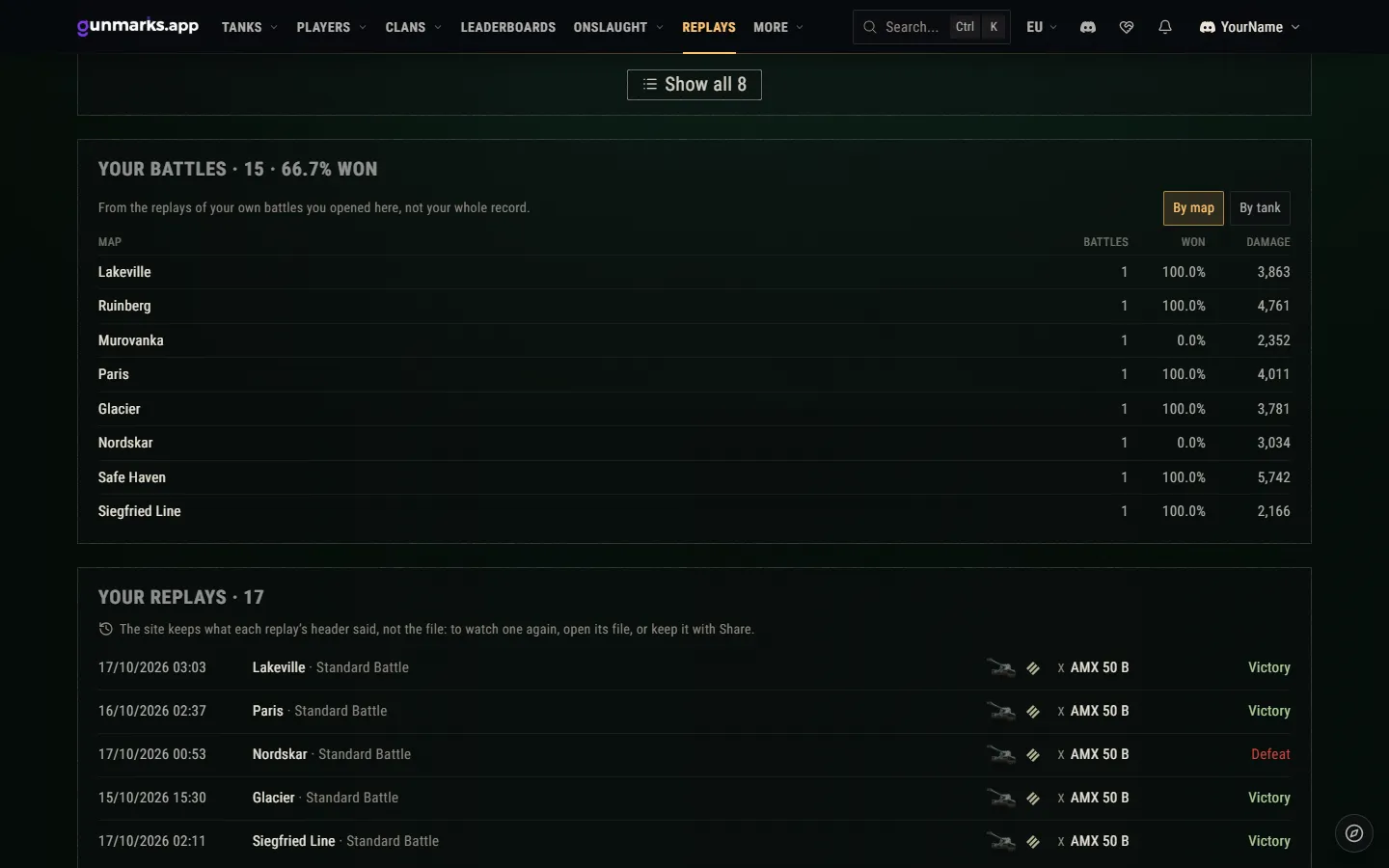
The Replay Inspector’s page now shows Your battles, free: your win rate and average damage by map and by tank, from the replays of your own battles you opened here. Only the battles of your linked World of Tanks accounts count, never a friend’s replay or a spectator’s, and replays you opened before fill in as you open them again.

Your battles, 15 at 66.7% won: the battles, the share won and the average damage on each map, with By map and By tank, and the list of your replays under it.

Heatmap views, on any device

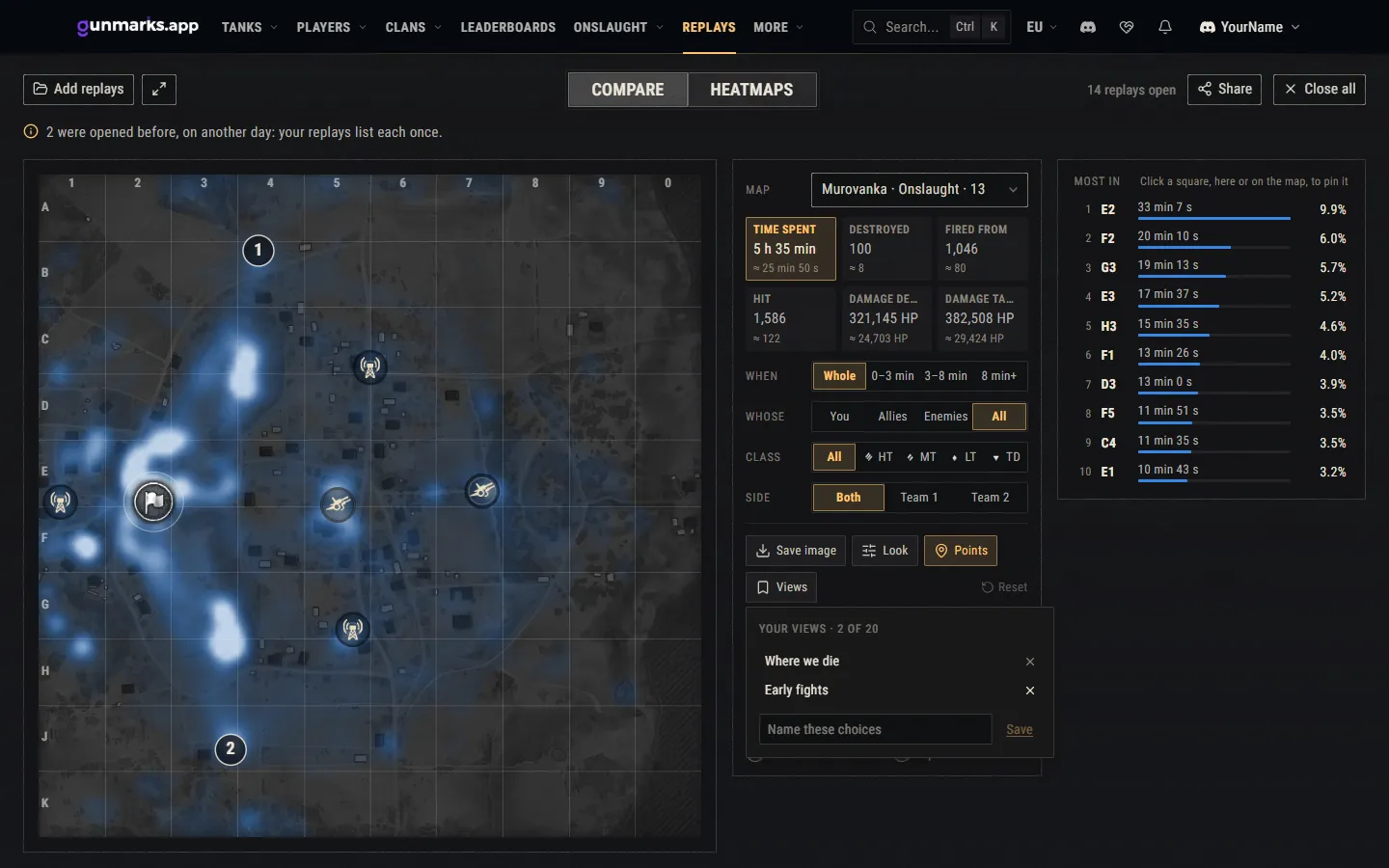
Supporters can keep a heatmap’s choices as a view under a name (what it measures, whose, which side, the phase, the class, the look and the squares pinned) and bring it back on any device, up to 20 views. A view is the choices alone, so it applies to whatever replays are open. Views kept stay to bring back and delete after perks end.

The heatmap of Murovanka across 14 open replays with Views open: two views kept, Where we die and Early fights, 2 of 20, and a field to name the choices on the screen.

Colour-blind colours in the armor view

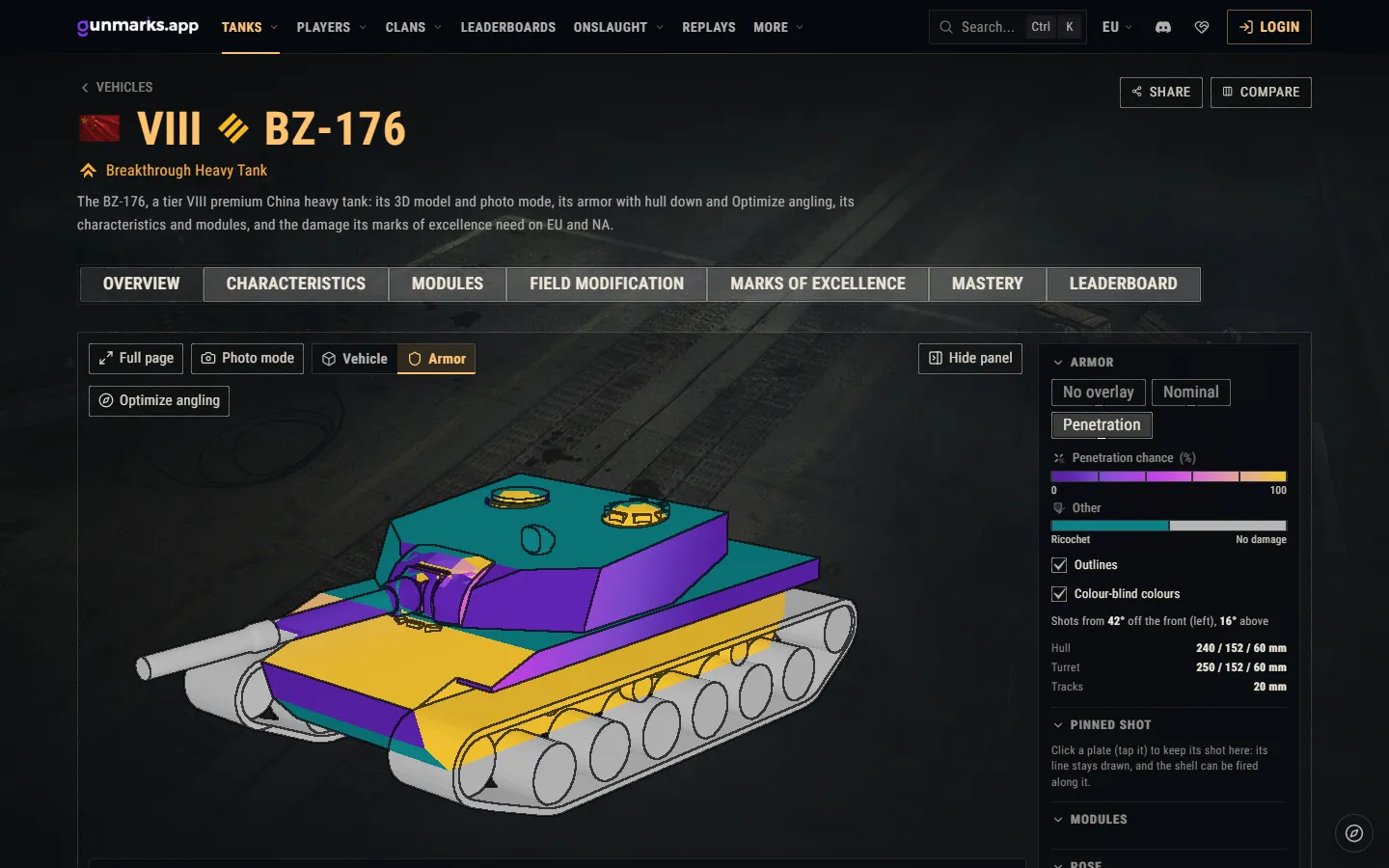
The armor view has a Colour-blind colours setting: the game’s own colour-blind colours on the Nominal and Penetration overlays, their legend and the line of a pinned shot. Your choice is kept in your browser.

The BZ-176’s armor view in the game’s colour-blind colours: the chance a shell goes through each plate from violet to yellow, ricochets in teal, the setting ticked beside it.

Improved5

As many replays as you like

The Replay Inspector no longer limits the replays you open in a day or have open at once: open one, or a thousand together.

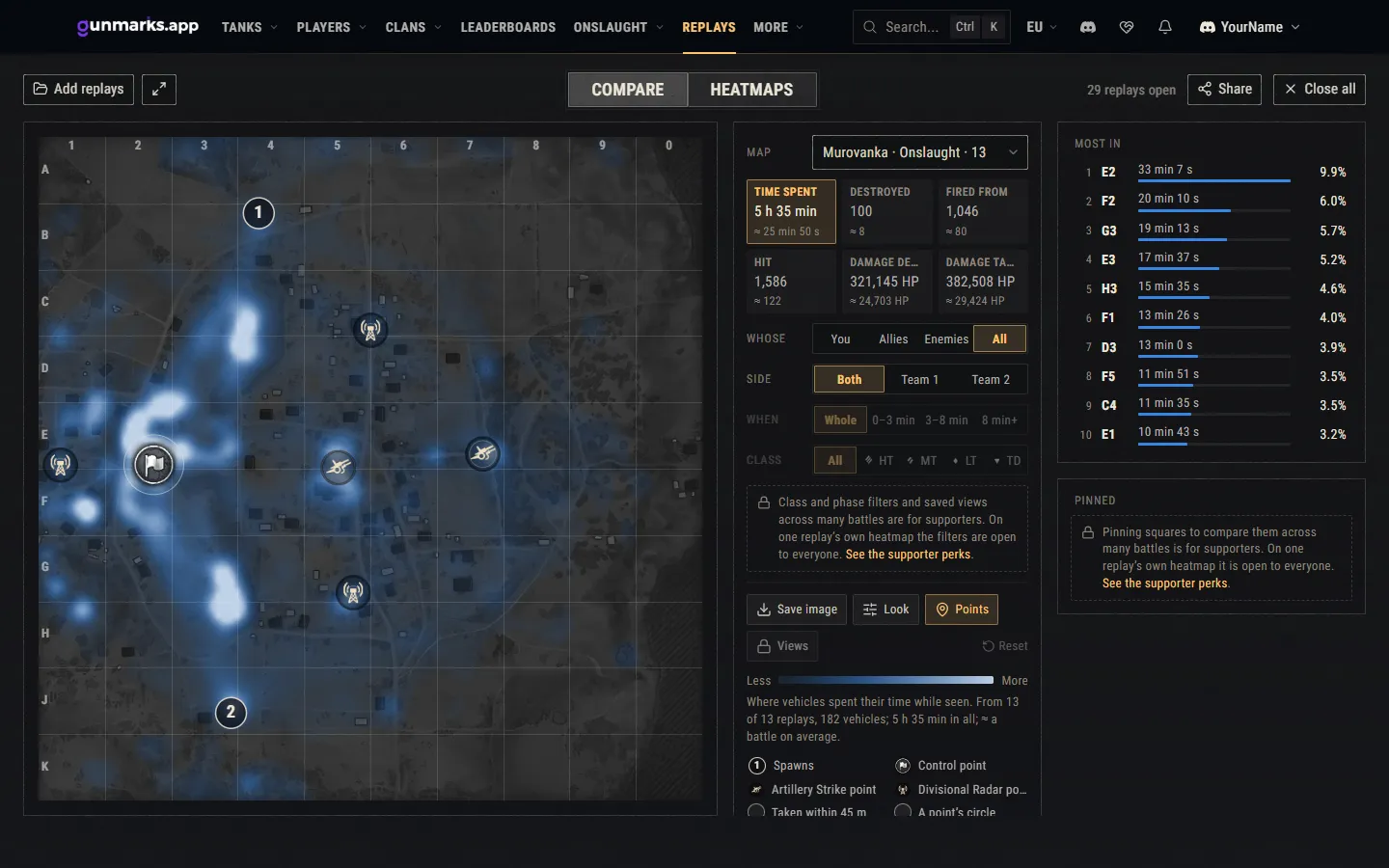
One battle is everything for everyone: its results, the Team Score, the battle on the minimap and its own heatmap with every tool. Compare and the heatmaps across several battles stay open to everyone too; there, the class and phase filters and the pinned squares are for supporters, shown in their place with a lock that says what they do.

29 replays open together on the Heatmaps tab: where the vehicles of 13 battles on Murovanka spent their time, and the class and phase filters, views and pinned squares locked for supporters.

Compare vehicles, easier to read

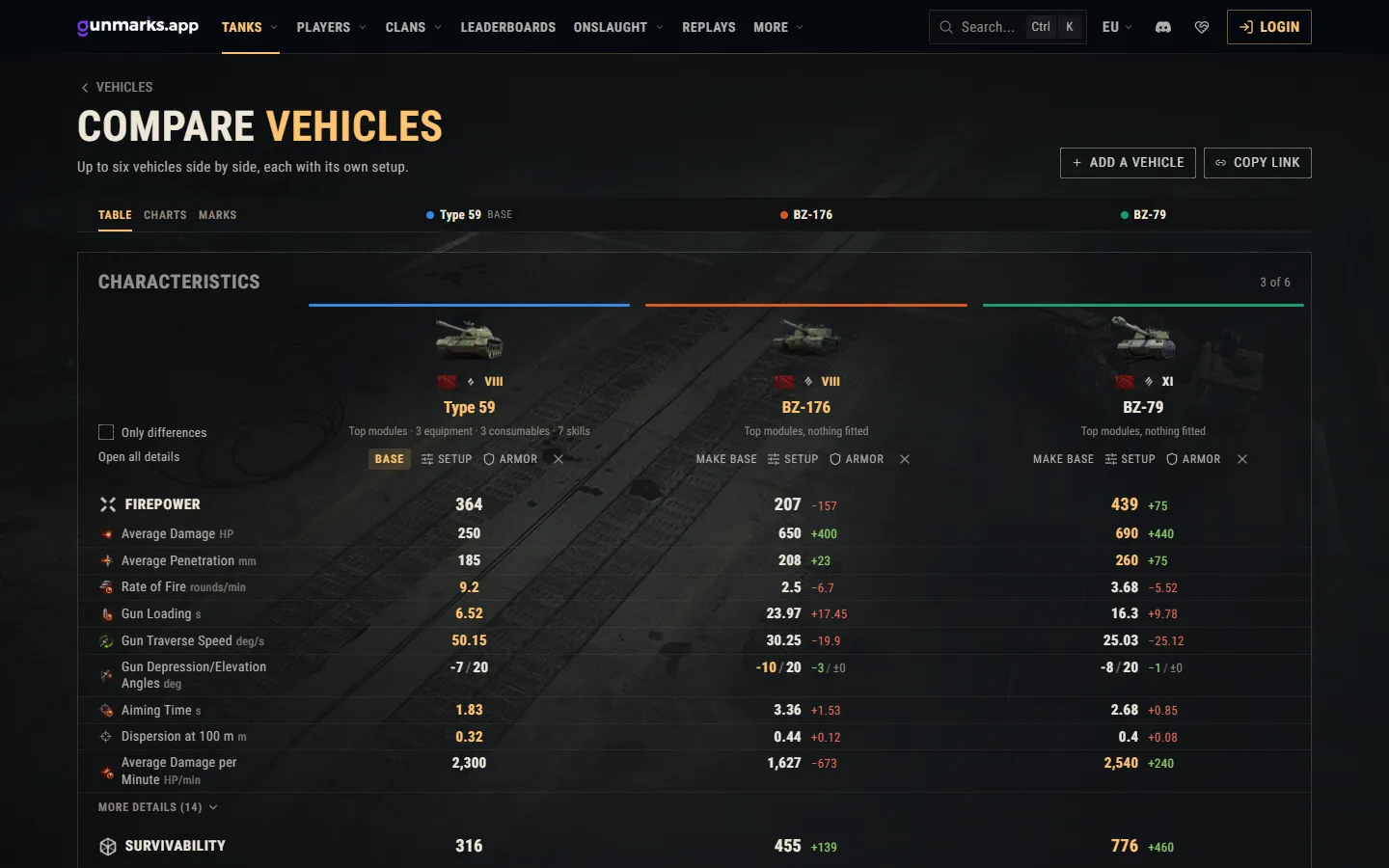
The comparison of up to six vehicles reads more easily and is quicker to set up.

  • A bar under the header keeps each vehicle’s name over its column, and the way to the table, the charts and the marks, in view all the way down, on a phone too.
  • Each row is one line, the values and their differences lined up down each column.
  • Only differences leaves out the rows that read the same for every vehicle, and Open all details opens every group’s details at once.
  • On a phone, two vehicles fit side by side with nothing to scroll sideways.
  • The setup panel keeps the vehicle’s main figures in view as you change it, each with how far it has moved.
  • For eight seconds after you take a vehicle out, Undo brings it back where it stood, its setup with it.
  • With nothing on the page, three ready comparisons start you off: tier X heavy tanks, tier X medium tanks and tier VIII premium medium tanks.
The Type 59 with its own setup, the BZ-176 and the BZ-79 under the bar of names and sections, with Only differences and Open all details, each row on one line.

The 3D view on a phone

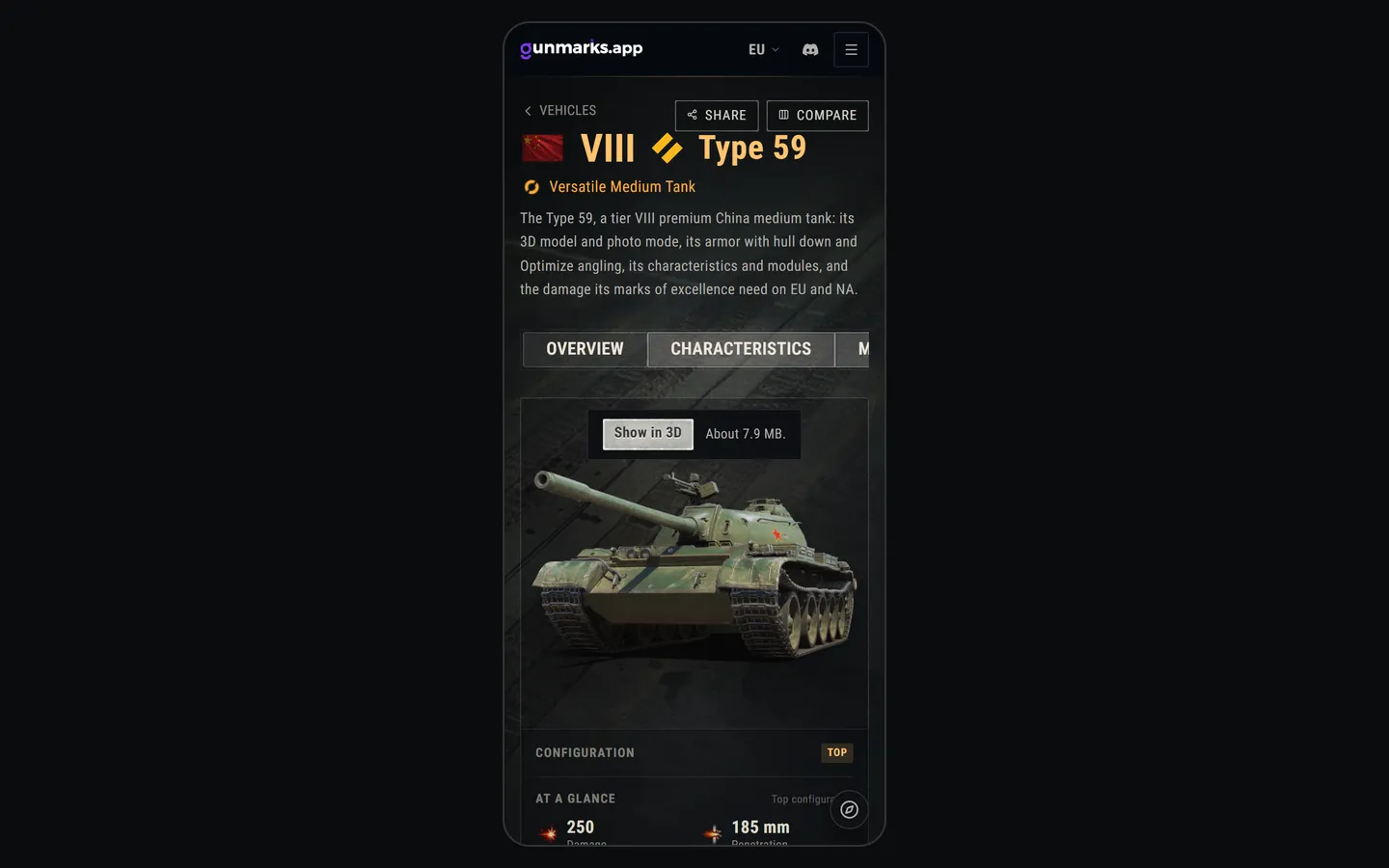
On a phone, or in a browser saving data, a vehicle’s page shows the vehicle’s picture with Show in 3D and about how much the 3D view would download, instead of loading it unasked. On a desktop it opens at once, as before.

If the graphics card takes the 3D view back, Load it again brings it back without reloading the page, and if it cannot start, Try again does: the rest of the page stays. The view also stops drawing while it is scrolled out of sight.

The Type 59’s page on a phone: the vehicle’s picture in place of the 3D view, with Show in 3D and how much it would download, about 7.9 MB.

The Support page, in plain words

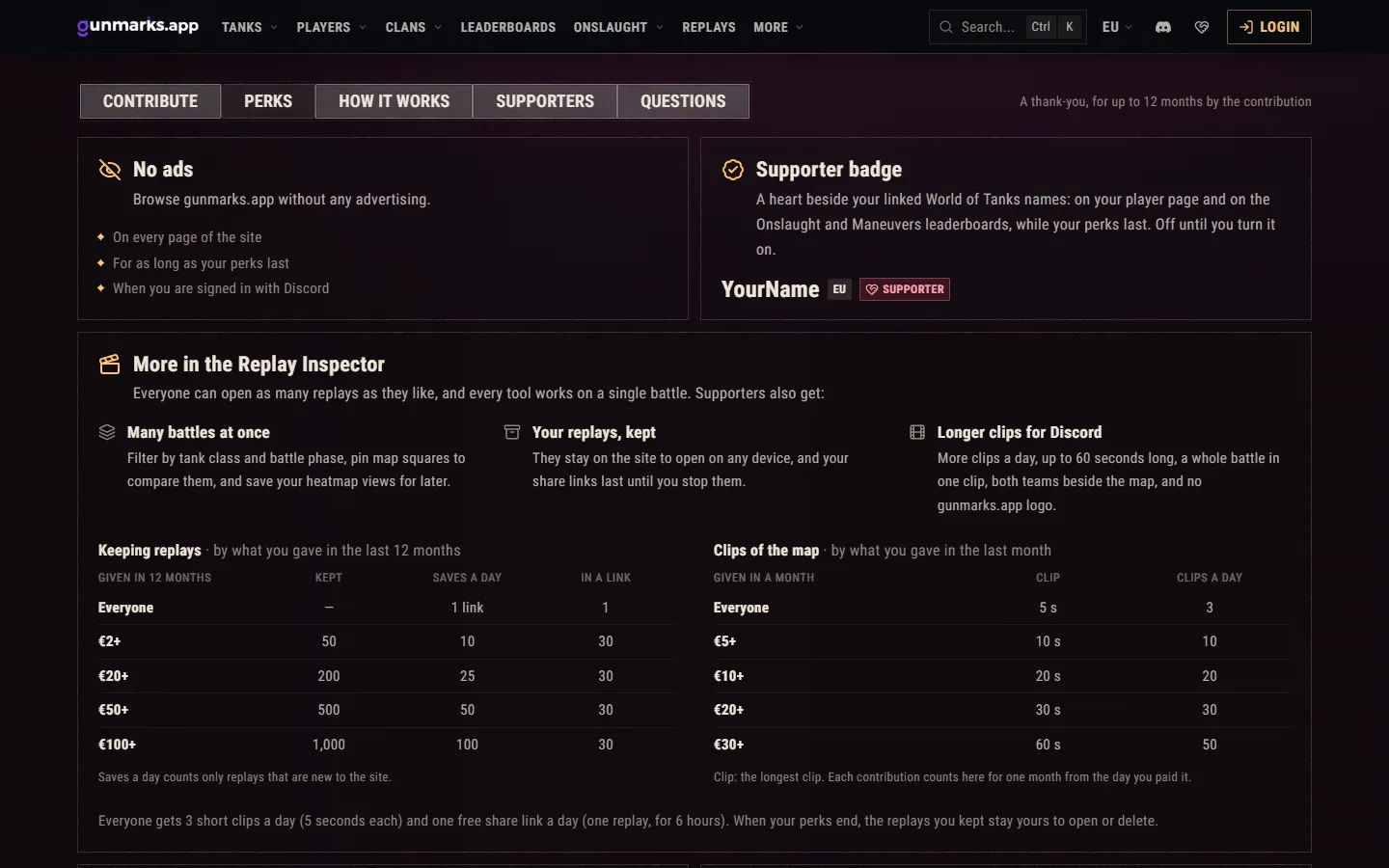
The Support page’s perks are rewritten in plain words: the short ones side by side, and the Replay Inspector’s across the page with two tables, the replays kept by what you gave in twelve months and the clips by what you gave in a month. In the Replay Inspector supporters now get the tools across many battles, their replays kept and longer clips, where they used to get more replays a day.

The Support page’s perks: No ads and the supporter badge side by side, and More in the Replay Inspector across the page with its two tables, replays kept and clips of the map.

Global rating on the leaderboards

The player leaderboards now show each player’s global rating next to their WTR, over the last 24 hours, the last 7 days and overall. On the overall board it is also a ranking of its own: press Global rating at the top of its column for the best players by it.

Fixed1

Fixes

  • The replay page of an Onslaught Competitive battle shows the tank each player fought in, where it showed the one they had when the countdown began. Battles kept before show the right tanks too, and so does the map analysis.
  • Without WebGL, a vehicle’s page keeps the vehicle’s picture and says why, where the whole page went to the error screen.
  • One person could fill the room the site keeps for saved replays and stop everyone else saving: free links now take half of it at most, and a day’s saves are counted as they are made, so stopping a link no longer gives them back.
  • The Support page no longer says that a linked World of Tanks account alone removes the ads: they go for a supporter signed in with Discord.

Faster1

Lighter and quicker

  • On a phone, a vehicle’s page downloads about 1.5 MB until you ask for its 3D view, where it downloaded 10 to 22 MB: the Type 59’s went from 9.7 MB to 1.6 MB.
  • The picture in place of the 3D view is the site’s own: 30 KB where it was 293 KB, and the vehicle drawn larger on a phone.
  • The 3D models are sent a piece at a time as they are read, where the server held each whole file several times over while sending it.
  • A replay being saved is read in a process of its own, so the site no longer stalls for everyone else meanwhile.

Security1